


تحديث لوحة العدادات الرقمية لسيارات فولكس فاجن باسات B6/B7/CC: الموديلات المتوافقة، طريقة التركيب، والحلول الشائعة
هل يمكن تركيب مجموعة عدادات رقمية في باسات B6 أو B7 أو CC؟
يشرح هذا الدليل الخاص بتعديل مجموعة العدادات الرقمية في سيارات فولكس فاجن باسات B6/B7/CC أمور التوافق والتركيب والمعايرة ومشكلات الإعداد الشائعة التي من المرجح أن يواجهها المالكون. نعم — على سيارات منصة PQ المدعومة التي تأتي في الأصل بلوحة عدادات ميكانيكية صحيحة. الجزء المهم ليس اسم الطراز وحده؛ بل يجب أن تتطابق لوحة العدادات الأصلية والموصل وشكل لوحة القيادة وموضع عجلة القيادة ومسار الأجهزة المحتفظ بها قبل التركيب.
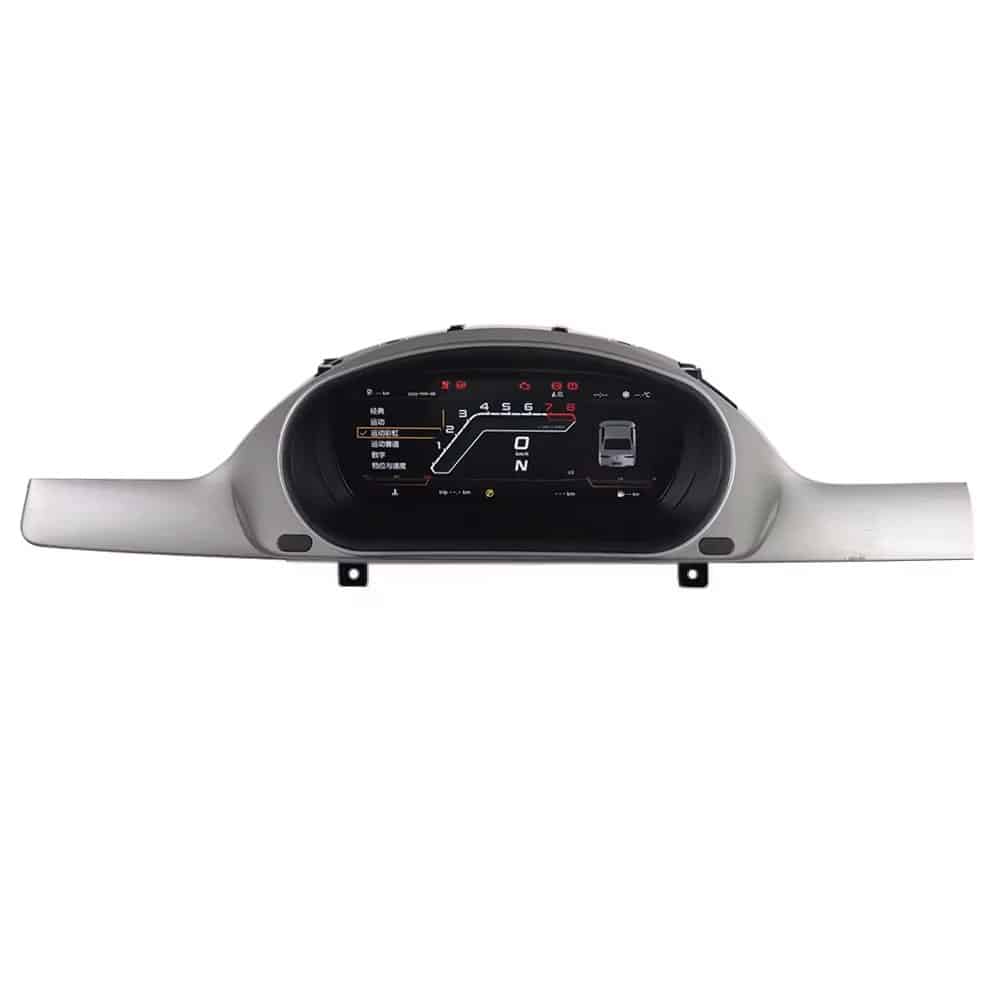
هل تركيب لوحة العدادات الرقمية لفولكس فاجن باسات B6/B7/CC يناسب سيارتي؟
| مسار المركبة | سنوات الدليل الحالية | ما لا يزال بحاجة إلى تأكيد |
|---|---|---|
| VW Passat B6 | 2005–2011 | نمط مجموعة العدادات الميكانيكية الأصلية، الموصل، لوحة القيادة/الإطار ونسخة السوق. |
| VW Passat B7 | 2012–2016 | أجهزة مجموعة العدادات الأصلية، مسار الموصل، وضع عجلة القيادة والوظائف المطلوبة. |
| فولكس واجن CC | 2013–2018 | مسار الجيل/السوق، مجموعة العدادات الأصلية، الموصل وبنية لوحة القيادة. |
لماذا يهم هذا: تُظهر نقاشات المتحمسين مرارًا أن متغيرات “باسات” و “CC” و NMS/PQ وقطع التعديل OEM يمكن أن تستخدم موصلات أو بوابات أو طرق تكييف مختلفة. لذلك تعامل هذه المقالة المجموعة الأصلية كدليل التركيب الأساسي—وليس الشارة وحدها.
ما يجب إرساله مع طلبك
- الطراز والسنة بدقة
- اسم البلد / السوق
- مقود أيسر أو أيمن
- صورة واضحة للمجموعة الأصلية أثناء التشغيل
- صورة لوحة القيادة / الإطار
- صورة الموصل الخلفي إن أمكن
- الوظائف المطلوبة: أزرار التحكم في المقود، عرض الخريطة، بيانات المصنع
ما الذي تتحقق منه iKAGOO
تؤكد صفحة المنتج أن مطابقة الشحنة تراجع المجموعة الأصلية، لوحة القيادة، سنة المركبة، موضع المقود، ومسار الموصل. كما أن ربط الخريطة/كار بلاي والاحتفاظ ببيانات المصنع هي فحوصات تعتمد على الإصدار.
هل المجموعة الرقمية لسيارة باسات هي حقًا توصيل وتشغيل؟
هذا التمييز مهم لأن نتائج البحث تخلط بين وظيفتين مختلفتين تمامًا:
مسار الأجهزة المحتفظ بها بعد البيع
يمكن للشاشة LCD الجديدة إعادة استخدام أجهزة المجموعة الأصلية ومسار الحزام/الشاشة المطابق. هذا هو المسار الموثق في دليل وصفحة منتج iKAGOO Passat.
استبدال مجموعة OEM مستعملة
تركيب مجموعة Volkswagen OEM مختلفة يمكن أن يستلزم أعمال برمجة وعداد المسافات ونظام منع التشغيل/التكيف. لا ينبغي نسخ تعليمات المنتديات لتلك المهمة بشكل أعمى إلى عملية تعديل لاحقة تحتفظ باللوحة الرئيسية الأصلية.
هل تحتاج إلى برمجة VCDS أو برمجة ECU أو تكييف نظام منع التشغيل؟
بالنسبة لاستبدال مجموعة OEM مستعملة، يناقش مالكو فولكس فاجن عادةً مشكلات برمجة VCDS أو المسافة المقطوعة أو نظام منع التشغيل/التكيف. هذا مسار تقني منفصل. مسار iKAGOO للتركيب بعد البيع الموثق هنا مبني حول المجموعة المطابقة الصحيحة والأجهزة الأصلية المحتفظ بها، لذا يجب عليك اتباع المسار المقدم بدلاً من نسخ قيم برمجة استبدال OEM من سيارة أخرى.
متى لا تبدأ البرمجة
إذا تم تشغيل الشاشة ولكن تحذير أو مؤشر أو قيمة الوقود أو رسم السيارة غير صحيح، فتحقق أولاً من الإعدادات الموثقة واللوحات المحتفظ بها وإحكام توصيل الموصلات. العديد من مشكلات PQ الشائعة لها سبب يتعلق بالإعداد/المعايرة.
متى يتم التصعيد
إذا ظلت البيانات أو عناصر التحكم الحرجة غير صحيحة بعد الفحوصات الموثقة، فتوقف وأرسل إلى iKAGOO فيديو للشاشة وهي تعمل، وصفحة الإعدادات، وصورة للمجموعة الأصلية، وشاشة المجموعة الجديدة، ودليلًا على التوصيلات قبل تغيير برمجة السيارة.
ماذا يحدث لعداد المسافة ومانع التشغيل وبيانات السيارة المصنعية؟
هذا سبب آخر لعدم الخلط بين هذا الدليل واستبدال مجموعة OEM مستعملة. تعتبر صفحة منتج iKAGOO السرعة ودوران المحرك والوقود وعداد المسافة ومعلومات التحذير كفحوصات ملاءمة قبل الشحن، ويجب أن يؤكد الاختبار النهائي هذه القيم قبل إغلاق لوحة العدادات.
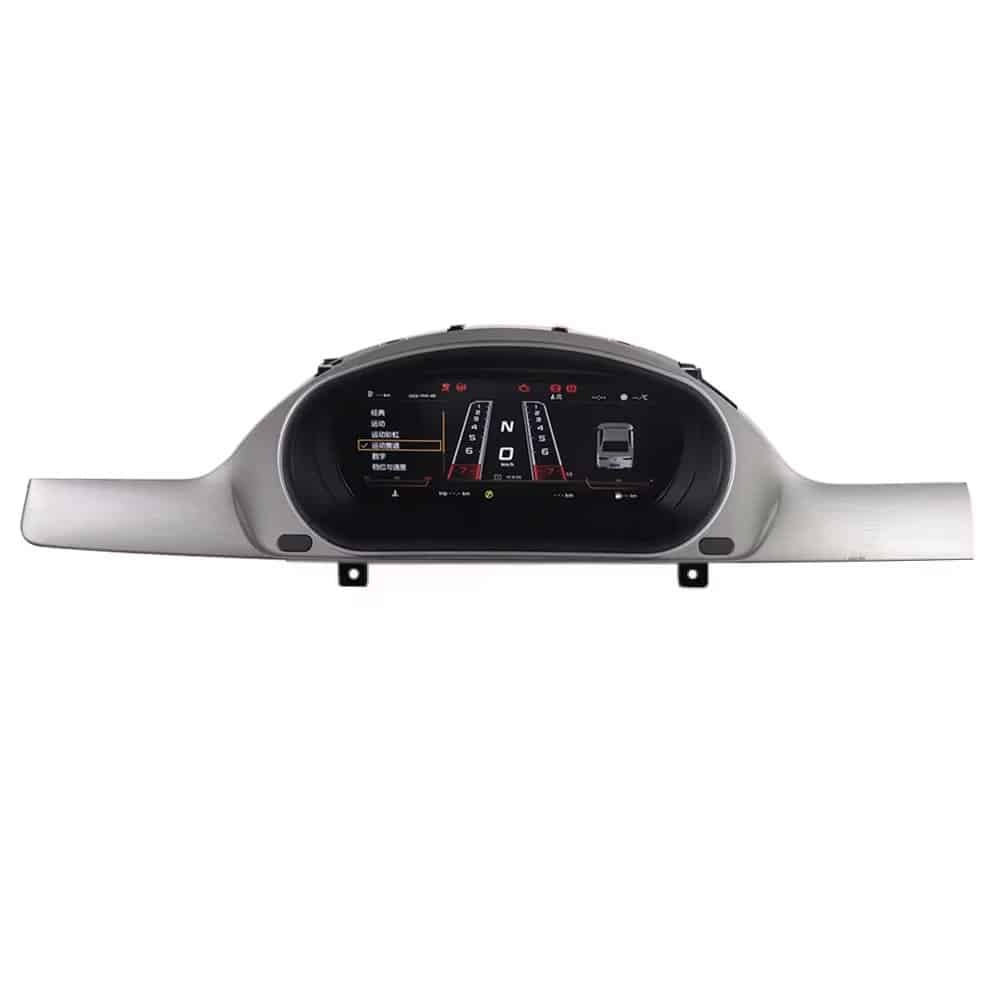
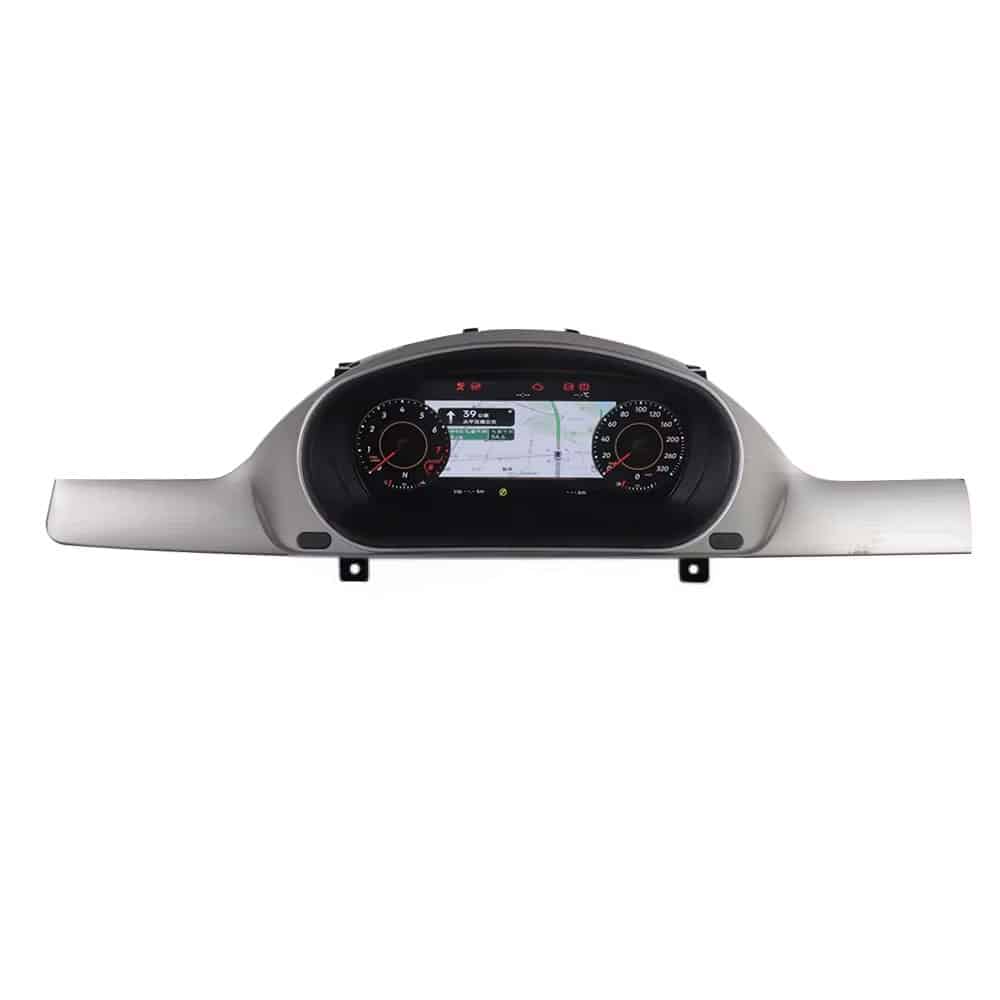
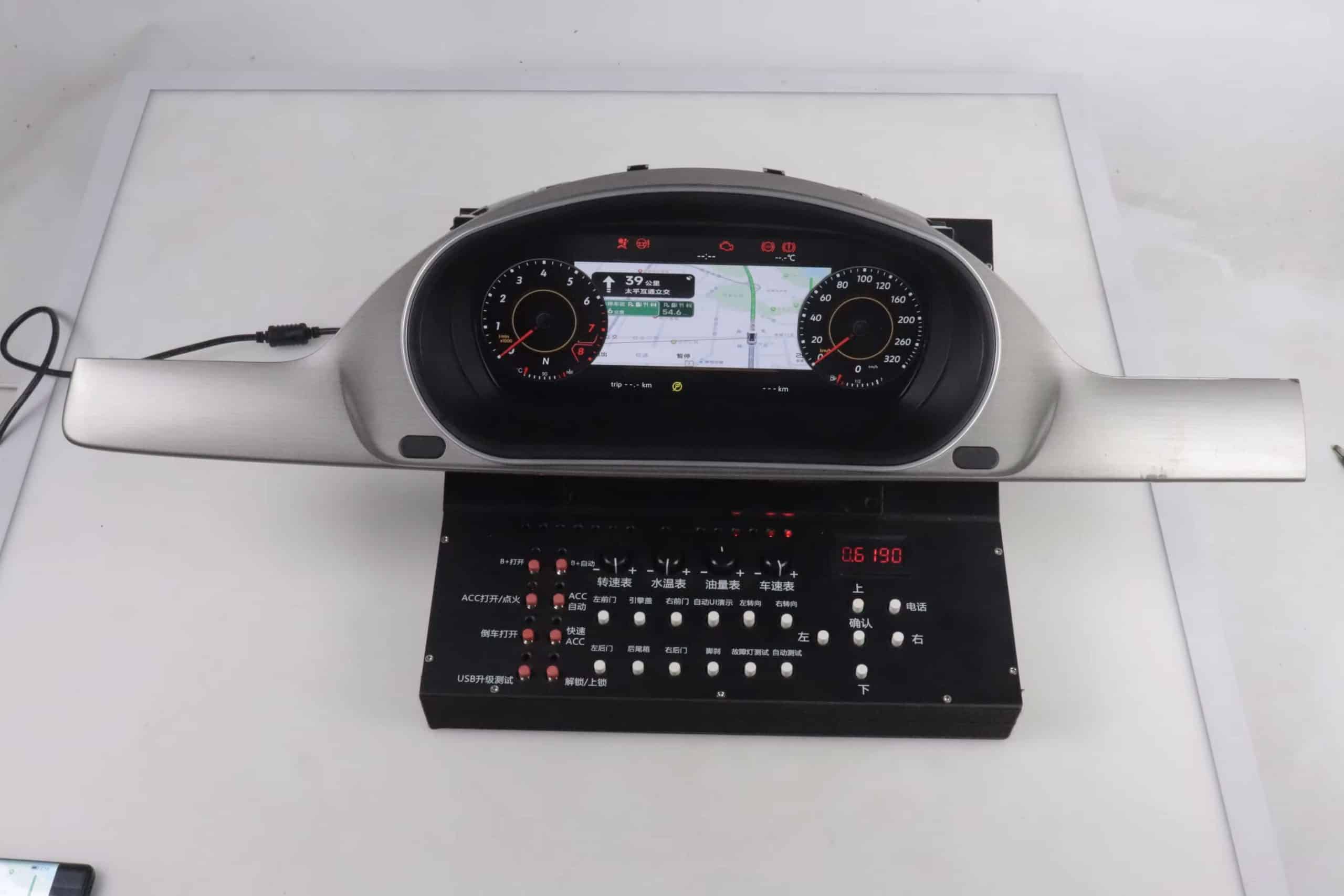
ما الذي يجب أن تفحصه قبل إزالة مجموعة العدادات الأصلية؟
الأدوات
- مفك توركس T20
- أداة إزالة الزخارف البلاستيكية
- مفك براغي فيليبس عند الحاجة إليه وفقًا للعتاد الموثق
- حزام معصم مضاد للكهرباء الساكنة أو ممارسة آمنة لتفريغ الشحنة الساكنة
- منظم صغير للبراغي والأجزاء المحفوظة
قبل إيقاف التشغيل
- التقط صورة للوحة العدادات الأصلية قيد التشغيل والتحذيرات الظاهرة
- سجل قراءة العداد كمرجع
- اضبط تحذير إطارات الشتاء وتحذير السرعة على الحد الأقصى، ثم عطّلهما في شاشة المعلومات المتعددة (MFD) حسب التوثيق
- أوقف تشغيل المركبة وافصل الكهرباء وفقًا لتعليمات التركيب
ما الذي يثبته هذا الفيديو: يستخدم منشور 14264 هذا الفيديو بالذات لخطوة إعداد تحذير الإطارات الشتوية / السرعة قبل إزالة لوحة العدادات الأصلية.
كيف تقوم بإزالة وتركيب لوحة العدادات الرقمية في باسات B6/B7/CC؟
ما الذي يثبته هذا الفيديو: فيديو التركيب الخاص بطراز iKAGOO يحدد باسات B6 2005–2011 وB7 2012–2016 وCC 2013–2018 ويُظهر سير العمل الفعلي للإزالة / التركيب. وهو لا يثبت بحد ذاته أي قاعدة شاملة لتوصيل الدبابيس أو قاعدة ترميز.
تأكيد المجموعة الأصلية ولوحة القيادة
قارن المجموعة الأصلية المزوّدة بالطاقة، والإطار، ومسار الموصل مع إصدار المنتج المؤكد. لا تفكك السيارة إذا كان المسار المقدم لا يتطابق بصريًا.
احمِ الزخرفة وأزل المجموعة الميكانيكية الأصلية
حرر الزخرفة المحيطة ونقاط التثبيت دون إجبار المشابك. اسحب المجموعة للأمام بالتساوي وحرر الموصل الخلفي بواسطة قفله، وليس بسحب الأسلاك.
افتح المجموعة على طاولة عمل محمية
حافظ على تنظيم البراغي والأجزاء. تعامل مع اللوحات المكشوفة من الحواف وتجنب لمس المكونات. هيكل اللوحة الأم / نواة المجموعة الأصلي جزء من مسار التعديل الموثق.
انقل فقط الأجهزة المطلوبة من قبل المجموعة الأصلية
تتضمن بعض الإصدارات ذات المواصفات الأعلى لوحة PCB مساعدة صغيرة إضافية، بينما لا تتضمنها أخرى. انقلها فقط عندما تكون موجودة ومطلوبة حسب المسار المؤكد.
أعد توصيل مجموعة العدادات المطابقة ووجّه الأسلاك التي يمكن الوصول إليها
أحكم تركيب كل موصل بالكامل، وأبقِ أسلاك USB بعيدة عن حركة عمود التوجيه، ولا تحصر الحزام خلف مجموعة العدادات.
شغّل الطاقة واختبر قبل إغلاق لوحة العدادات
تحقق من الإقلاع، والسرعة/عدد اللفات، والوقود، والتحذيرات، ومؤشرات الاتجاه، وأدوات التحكم في عجلة القيادة حيثما كانت مدعومة، ورسوم السيارة، والوصول إلى USB، وأي مسار مؤكد لربط الخريطة/CarPlay.
هل تحتاج إلى نقل اللوحة الأم الأصلية أو لوحة PCB المساعدة؟
اللوحة الأم الأصلية / نواة مجموعة العدادات
احتفظ باللوحة الأصلية والجرس/مكبر الصوت تمامًا كما هو مطلوب في البناء المؤكد. إعادة استخدام العتاد الأصلي هو أحد الأسباب التي تجعل هذا التعديل اللاحق لا يُعامل كاستبدال كامل عام لمجموعة العدادات.
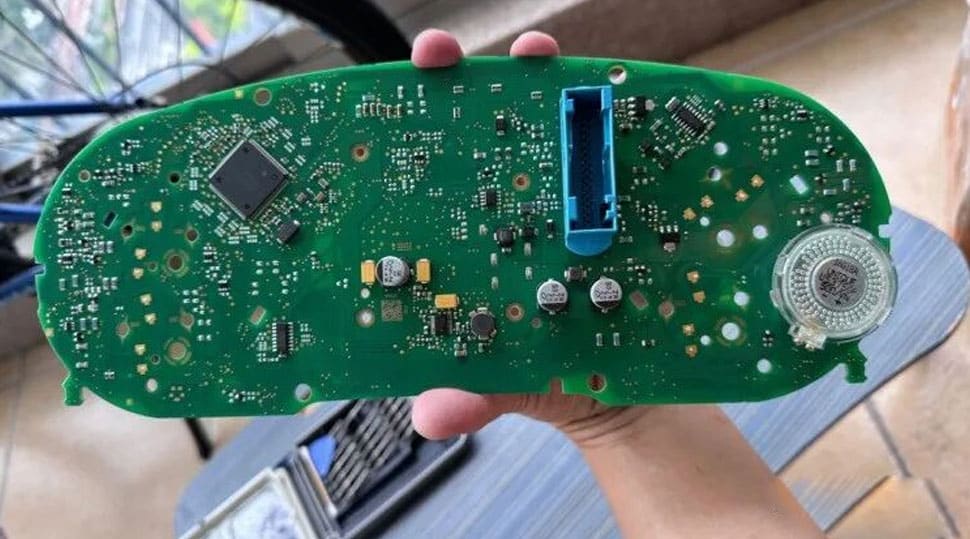
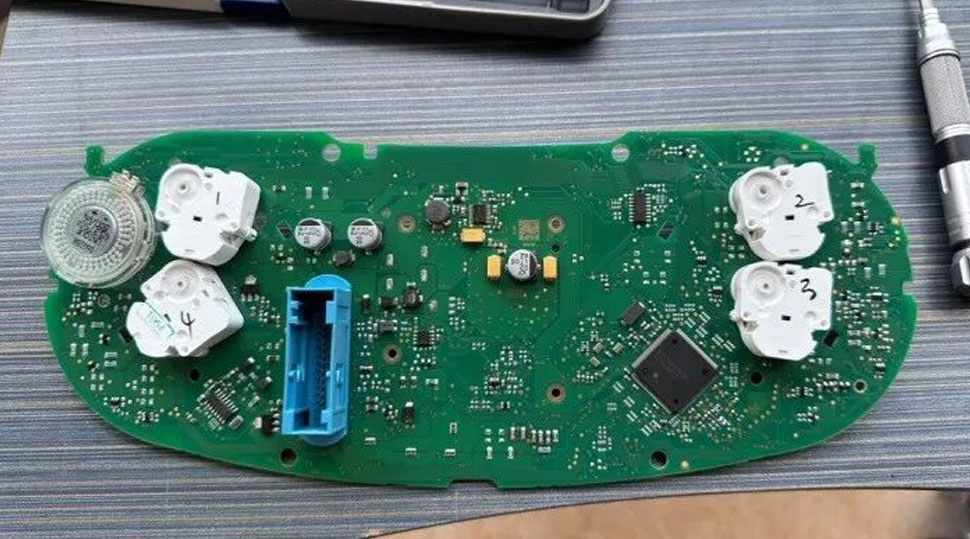
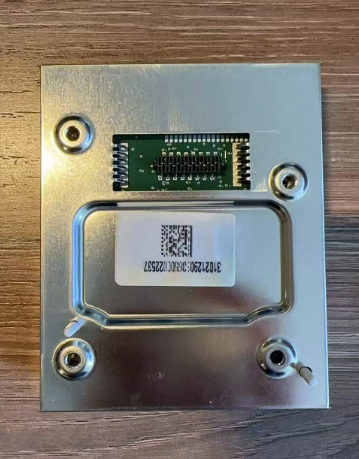
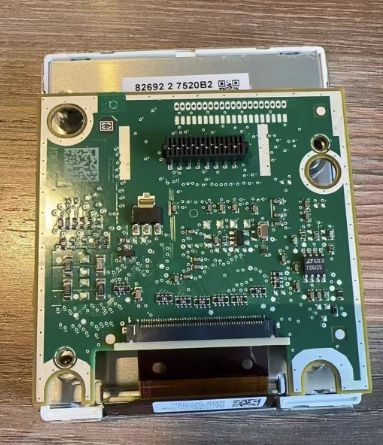
لوحة دوائر مطبوعة مساعدة صغيرة اختيارية
إذا كانت مجموعة العدادات الأصلية لديك تحتوي على اللوحة الصغيرة خلف الشاشة المركزية، فاحتفظ بها وثبّتها. تشير مواد باسات الحالية إلى أن إغفال اللوحة أو تركيبها بشكل غير صحيح يرتبط بقراءات وقود غير دقيقة أو تحذيرات من مجموعة العدادات.
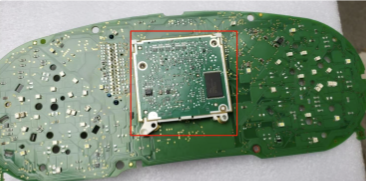
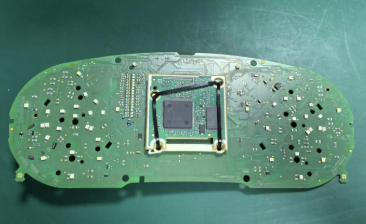
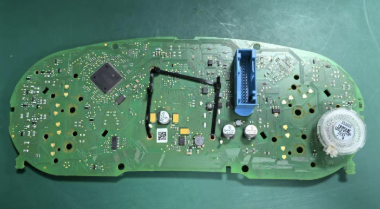
ما الذي يثبته هذا الفيديو: يستخدم منشور 14264 هذا الفيديو بالضبط كمرجع لتركيب اللوحة الرئيسية / نواة مجموعة العدادات. وهو يدعم مسار العمل على اللوحة المحتفظ بها على الطاولة، لكنه لا يثبت أن كل B6/B7/CC تستخدم أجهزة داخلية متطابقة.
كيف يجب توجيه كابلات USB؟
لماذا يكون مقياس الوقود خاطئًا أو تكون شاشة إشارات الانعطاف مفقودة بعد التثبيت؟
لماذا لا يظهر مؤشر الوقود ممتلئًا؟
عادةً، ابدأ بالمعايرة. بعد ملء خزان الوقود بالكامل، قُد لفترة قصيرة، ثم افتح بيانات القيادة → كمية التزود بالوقود / القابلة للإضافة / القابلة لإعادة التعبئة, ، لاحظ القيمة، ثم أدخلها تحت الإعدادات → معايرة التكوين → سعة خزان الوقود. احفظ وأعد الفحص. إذا ظلت النتيجة غير طبيعية، تحقق مما إذا كانت لوحة العرض الأصلية عالية المواصفات تحتوي على لوحة دوائر مساعدة كان ينبغي الاحتفاظ بها.
ما الذي يثبته هذا الفيديو: يستخدم المنشور 14264 هذا الفيديو بالضبط لمعايرة سعة خزان الوقود PQ بعد التركيب. وهو يدعم مسار المعايرة الموثق، وليس كل تشخيص ممكن لمرسل الوقود.
لماذا إشارات الانعطاف مفقودة أو غير صحيحة؟
تحقق من الأضواء الفعلية أولاً. ينص دليل PQ الحالي على أن الأضواء المادية يجب أن تبقى على وضع OFF (إيقاف). إذا تم تمكينه، فقد لا يظهر مؤشر إشارة الانعطاف بشكل صحيح.
إذا ظهر مصباح تحذير أثناء الفحص النهائي للوظيفة، قارنه بـ إرشادات فولكس فاجن الرسمية لأضواء التحذير قبل افتراض أن الشاشة الرقمية نفسها هي المسؤولة عن العطل.
ما الذي يثبته هذا الفيديو: يستخدم المنشور 14264 هذا الفيديو بالضبط لمسار إعداد الأضواء الفعلية PQ وتصحيح مؤشر إشارة الانعطاف. تحقق من ذلك قبل تغيير الأجهزة أو نسخ قيم الترميز من مركبة أخرى.
| الأعراض | افحص أولاً | توقف / صعّد عند |
|---|---|---|
| مؤشر الوقود غير دقيق | معايرة سعة خزان الوقود؛ يتطلب لوحة PCB مساعدة | تظل بيانات الوقود الحرجة غير معقولة بعد الفحوصات الموثقة. |
| مؤشر إشارة الانعطاف مفقود | الأضواء الفعلية مطفأة. | يظل المؤشر خاطئًا بعد الضبط الصحيح وإعادة التشغيل. |
| رسم المركبة خاطئ. | الإعدادات → اختيار طراز السيارة؛ إيقاف التشغيل، القفل، إعادة الاختبار | خيار الطراز الصحيح غير متوفر أو بيانات السيارة الأخرى خاطئة. |
| شاشة سوداء / إعادة تشغيل متكررة | إحكام توصيل الموصل والعتاد المرفق الصحيح | لا تستمر في القيادة مع معلومات الأجهزة الحيوية غير الموثوقة. |
| التحذيرات / أدوات التحكم تختلف | قارن مع صور الحالة الأصلية؛ اللوحات المحتفظ بها؛ الإعدادات | أرسل الأدلة إلى iKAGOO قبل أي تغيير في البرمجة. |
هل ستظل أزرار عجلة القيادة وأضواء التحذير وبيانات المصنع تعمل؟
لا تتعامل مع بدء التشغيل النظيف على أنه الاختبار النهائي. قبل إغلاق لوحة العدادات، تحقق من جميع الوظائف التي طلبت المنتج للاحتفاظ بها فعليًا.
- السرعة وعدد الدورات في الدقيقة يستجيبان بشكل معقول.
- مستوى الوقود وبيانات المسافة/الرحلة معقولة.
- أضواء التحذير ومؤشرات الانعطاف تعمل بشكل صحيح.
- تعمل أزرار عجلة القيادة أو أزرار العمود حيث يدعمها المسار المؤكد.
- الرسم المحدد للمركبة يطابق السيارة.
- أي مسار عرض خريطة/CarPlay مشمول في الطلب يعمل من خلال النظام المرتبط المؤكد.
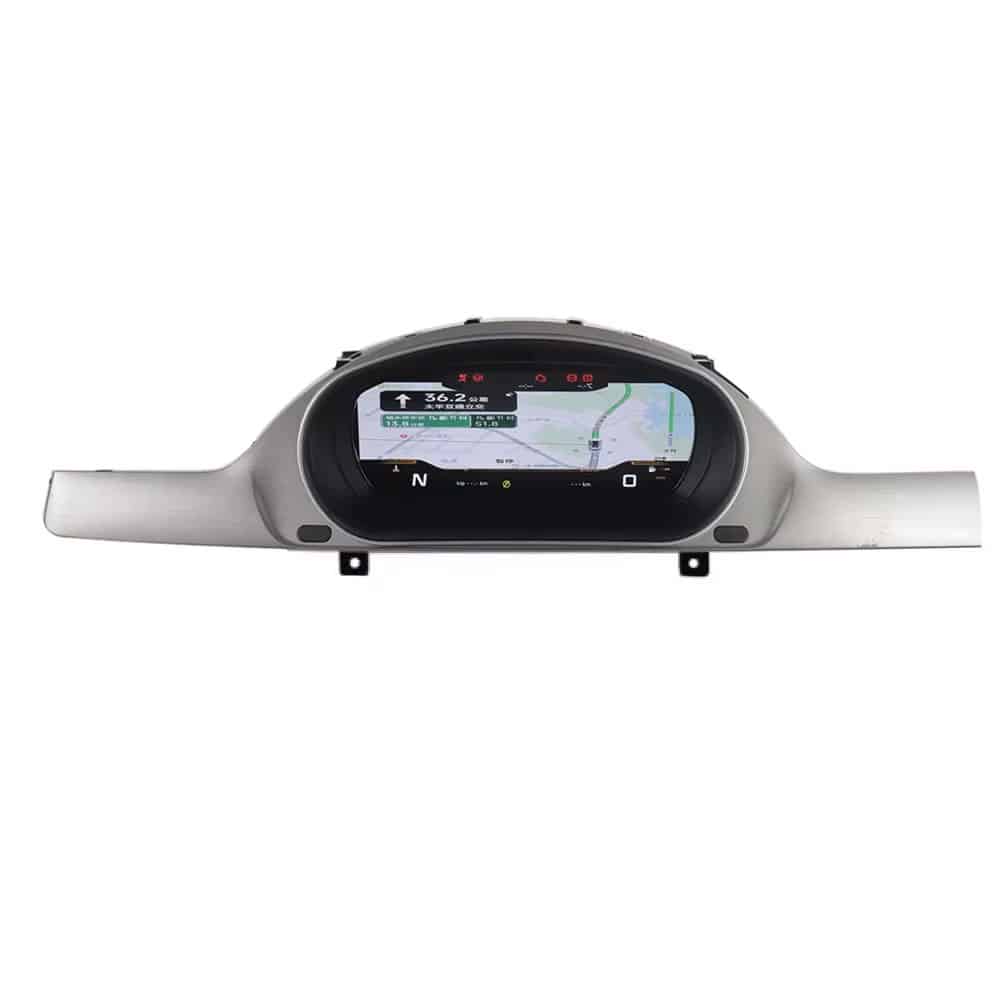
هل يمكن للوحة العدادات الرقمية في باسات عرض CarPlay أو خرائط الملاحة؟
ما مدى موثوقية لوحة عدادات رقمية بديلة لسيارة باسات للاستخدام اليومي؟
بالنسبة لتركيب لوحة عدادات رقمية لسيارة فولكس فاجن باسات B6/B7/CC، ينشر الدليل الحالي iKAGOO ملخص اختبار الموثوقية الذي يغطي جهد التشغيل، وارتفاع الجهد/تقلبات الطاقة، والتفريغ الكهروستاتيكي، واختبار درجة الحرارة، ودورات التشغيل المتكررة، وحمل بيانات CAN، واختبارات إجهاد الذاكرة. هذه الاختبارات تدعم الثقة في العتاد المزوّد، لكنها لا تلغي الحاجة إلى توافق خاص بالمركبة واختبار نهائي على السيارة.
كهربائي
يذكر الدليل الحالي التشغيل عبر 9–16 فولت بالإضافة إلى محاكاة ارتفاع الجهد وتقلبات الطاقة.
البيئة
يقدم الدليل الحالي تقارير عن اختبارات التخزين والتشغيل في درجات الحرارة المنخفضة/المرتفعة بالإضافة إلى فحوصات ESD.
البرمجيات / التحمل
يقدم الدليل الحالي تقارير عن اختبارات إعادة التشغيل المتكررة، وحمل بيانات CAN، واختبارات إجهاد القراءة/الكتابة لذاكرة DDR/Flash.
ما مدى صعوبة التركيب، وهل تستحق الترقية العناء؟
ترقية القيمة
قيمة الاستخدام اليومي مرتفعة لأن التعديل التحديثي يحدّث شاشة السائق مع إبقاء بيانات القيادة الأساسية في الأفق، ويمكنه إضافة مسار عرض خريطة مؤكد. وهي ليست أعلى لأن عرض الخريطة/CarPlay يعتمد على المصدر/وحدة التحكم الخارجية المتوافقة، وشاشة العدادات ليست وحدة أندرويد مستقلة.
الإجراء الذي يتعين على المشتري اتخاذه: تأكد مما إذا كانت مزامنة الخريطة جزءًا من المسار المطلوب.
التوافق مع الطرازات الأصلية للسيارات
توافق قوي بعد التأكيد لأن المسار خاص بالمركبة ويمكنه الاحتفاظ بالمنطق الأصلي للعتاد/البيانات. النتيجة ليست 100 لأن تسميات سنة الطراز، واختلافات السوق، وموضع المقود، والموصلات، والتعديلات السابقة يمكن أن تغير المسار الدقيق.
الإجراء الذي يتعين على المشتري اتخاذه: أرسل صور مجموعة العدادات الأصلية ولوحة القيادة قبل الشحن.
سهولة التركيب
مستوى L3 (تركيب ذاتي متقدم): إزالة مجموعة العدادات، وأعمال التشذيب، والتعامل مع اللوحة، وتمديد الكابلات، والمعايرة/الاختبار بعد التثبيت مطلوبة. يُنصح بفني تركيب إلكترونيات مركبات ذي خبرة إذا لم تكن مرتاحًا للعمل حول إلكترونيات العدادات.
توقف: لا تجبر الموصلات، ولا تقطع الأسلاك، ولا تغلق لوحة القيادة ببيانات حرجة غير صحيحة.
ما الذي يجب اختباره قبل إغلاق لوحة القيادة؟
فحوصات الأجهزة الحرجة
- إقلاع مستقر دون إعادة تشغيل متكررة
- السرعة وRPM
- مستوى الوقود
- عرض المسافة / الرحلة حيثما ينطبق ذلك
- سلوك التحذير والمؤشرات
- إشارات الانعطاف
فحوصات المركبة / الخيارات
- عناصر التحكم في عجلة القيادة أو الذراع حيثما كانت مدعومة
- رسم توضيحي لطراز السيارة
- منافذ USB يمكن الوصول إليها
- ربط الخرائط / CarPlay إذا كان مضمنًا في الطلب المؤكد
- ملاءمة فيزيائية متساوية دون ضغط على شاشة LCD
- احفظ صورة/فيديو لحالة التشغيل النهائية
الأسئلة الشائعة حول مجموعة العدادات الرقمية لـ VW Passat B6/B7/CC: أسئلة المشترين الحقيقية
تم ترتيب هذه الأسئلة حسب الأولوية بناءً على المخاوف المتكررة في البحث/المنتديات/الفيديو حول تحويل مجموعات العدادات الرقمية لـ Passat/CC، ثم تمت الإجابة عليها ضمن حدود منتج iKAGOO والتركيب الموثقة.
هل تناسب مجموعة العدادات الرقمية هذه كل Passat B6 وB7 وVolkswagen CC؟
معظم تكوينات باسات B6/B7/CC المتوافقة التي يغطيها هذا المنتج مدعومة. نطاق الطراز/السنة هو نقطة بداية، ويتم تأكيد الملاءمة النهائية مقابل مجموعة العدادات الميكانيكية الأصلية ولوحة القيادة/الإطار ومسار الموصل وموضع عجلة القيادة وإصدار السوق وأي تعديلات سابقة عند مراجعة طلبك.
هل هذا نفس تركيب شاشة Active Info Display الأصلية من Volkswagen؟
لا. هذا تحويل لمجموعة عدادات رقمية منصة PQ من السوق الثانوي لمسارات Passat/CC الأقدم. استبدال مجموعة عدادات OEM رقمية مستعملة هو عمل مختلف وقد يكون له متطلبات برمجة/تكييف مختلفة.
هل التثبيت حقًا Plug-and-Play؟
نعم، في معظم التركيبات المتطابقة بشكل صحيح. تم تصميم مسار تحويل مجموعة العدادات الرقمية VW Passat B6/B7/CC المتوافق بشكل صحيح لتجنب القطع والثقب واللحام في الأسلاك الأصلية، لكن التركيب لا يزال يتضمن إزالة مجموعة العدادات والعمل على الأجهزة على طاولة العمل والإعدادات والمعايرة والاختبار النهائي.
هل أحتاج إلى برمجة VCDS أو برمجة ECU؟
يستخدم مسار iKAGOO الموثق إعدادات مجموعة العدادات وقائمة التكوين الخاصة بها، وليس برمجة VCDS للمركبة. قد يتضمن استبدال مجموعة عدادات OEM مستعملة برمجة أو عمل على المسافة المقطوعة أو مانع التشغيل، لذا لا تنسخ تعليمات استبدال مجموعة عدادات OEM على تحويل السوق الثانوي مع الاحتفاظ باللوحة الأم إلا إذا أكد iKAGOO أنها تنطبق على الإصدار المورّد لك.
هل ستبقى معلومات المسافة المقطوعة ومانع التشغيل صحيحة؟
نعم، لمسار الاحتفاظ بالأجهزة الموثق في هذا الدليل. يعيد نهج السوق الثانوي الموثق استخدام أجهزة مجموعة العدادات الأصلية لتبقى متوافقة مع منطق البيانات الحالي للمركبة، ويتم تأكيد سلوك المسافة المقطوعة/مانع التشغيل الدقيق للإصدار المورّد واختباره قبل إعادة التجميع النهائي.
هل يجب علي نقل اللوحة الأم الأصلية؟
نعم، لمسار الاحتفاظ باللوحة الأم الموثق هنا. اللوحة الأصلية جزء أساسي من التحويل. اتبع التعليمات الخاصة بإصدار مجموعة العدادات المورّد بالضبط.
هل تحتوي كل مجموعة عدادات أصلية على لوحة الدوائر الإضافية الصغيرة؟
لا. بعض مجموعات العدادات الميكانيكية ذات المواصفات الأعلى تحتوي عليها والبعض لا يحتوي. إذا كانت مجموعتك الأصلية تحتوي على اللوحة والمسار المؤكد يتطلبها، انقلها؛ وإلا تخطَّ تلك الخطوة.
لماذا لا يظهر مقياس الوقود ممتلئًا بعد التركيب؟
عادةً، ابدأ بالمعايرة. استخدم إجراء سعة خزان الوقود الموثق بعد التعبئة الكاملة. إذا ظل غير صحيح، تأكد مما إذا تم الاحتفاظ بلوحة الدوائر الإضافية المطلوبة بشكل صحيح.
لماذا مؤشرات الإشارات مفقودة؟
تحقق من إعداد Physical Lights أولاً. ينص دليل PQ الحالي على أن Physical Lights يجب أن يبقى OFF؛ تفعيله قد يسبب سلوك عرض غير طبيعي للإشارات.
هل ستظل عناصر التحكم في عجلة القيادة وأضواء التحذير تعمل؟
نعم، حيث يدعم مسار السيارة المؤكد هذه الوظائف. يعتمد الاحتفاظ بالوظائف على التكوين الأصلي والأجهزة المتوافقة، لذا اختبر كل وظيفة مطلوبة قبل إغلاق لوحة القيادة.
هل يمكن لهذه العدادات الرقمية عرض خرائط CarPlay أو Android Auto؟
نعم، حيث يدعم المسار المطابق ذلك. يمكن عرض الملاحة من خلال مشغل Android متوافق أو وحدة تحكم أو مسار ربط. العدادات نفسها ليست وحدة رأس Android مستقلة.
هل يهم كون السيارة بقيادة يسرى أو يمنى، أو ديزل، أو نسخة إقليمية؟
معظم التكوينات المدعومة تغطي تصاميم القيادة اليسرى واليمنى. تُعد نسخ القيادة اليسرى/اليمنى والديزل والنسخ الإقليمية جزءًا من تأكيد ما قبل الشحن لأن شكل العدادات والموصل وتكوين السيارة قد تختلف حسب السوق.
هل يمكنني تثبيته بنفسي؟
نعم، إذا كانت لديك خبرة DIY متقدمة في تجميل السيارة والإلكترونيات. يقيّم iKAGOO هذا المسار كـ L3 DIY متقدم؛ يُوصى بالتركيب الاحترافي لمعظم المشترين الذين لا يشعرون بالراحة في التعامل مع لوحات مجموعة العدادات.
ماذا أرسل بعد تقديم طلبي؟
بعد تقديم طلبك، أرسل الطراز/السنة بالضبط بالإضافة إلى صور واضحة للعدادات الأصلية ولوحة القيادة. أدرج أيضًا موضع عجلة القيادة والبلد/السوق والوظائف التي تحتاج إلى الاحتفاظ بها أو إضافتها. صورة الموصل الخلفي مفيدة عند توفرها. يراجع iKAGOO هذا قبل الشحن ويجهّز النسخة الصحيحة لطلبك.
ماذا يجب أن أفعل إذا بدأت الشاشة بالعمل لكن البيانات الحيوية خاطئة؟
أوقف إعادة التجميع النهائي. سجّل فيديو للشاشة والإعدادات والبيانات غير الطبيعية، وأعد فحص الموصلات/الأجهزة المحتفظ بها/الإعدادات الموثقة، ثم أرسل الأدلة إلى iKAGOO قبل تغيير الترميز أو القيادة بناءً على معلومات عدادات غير موثوقة.
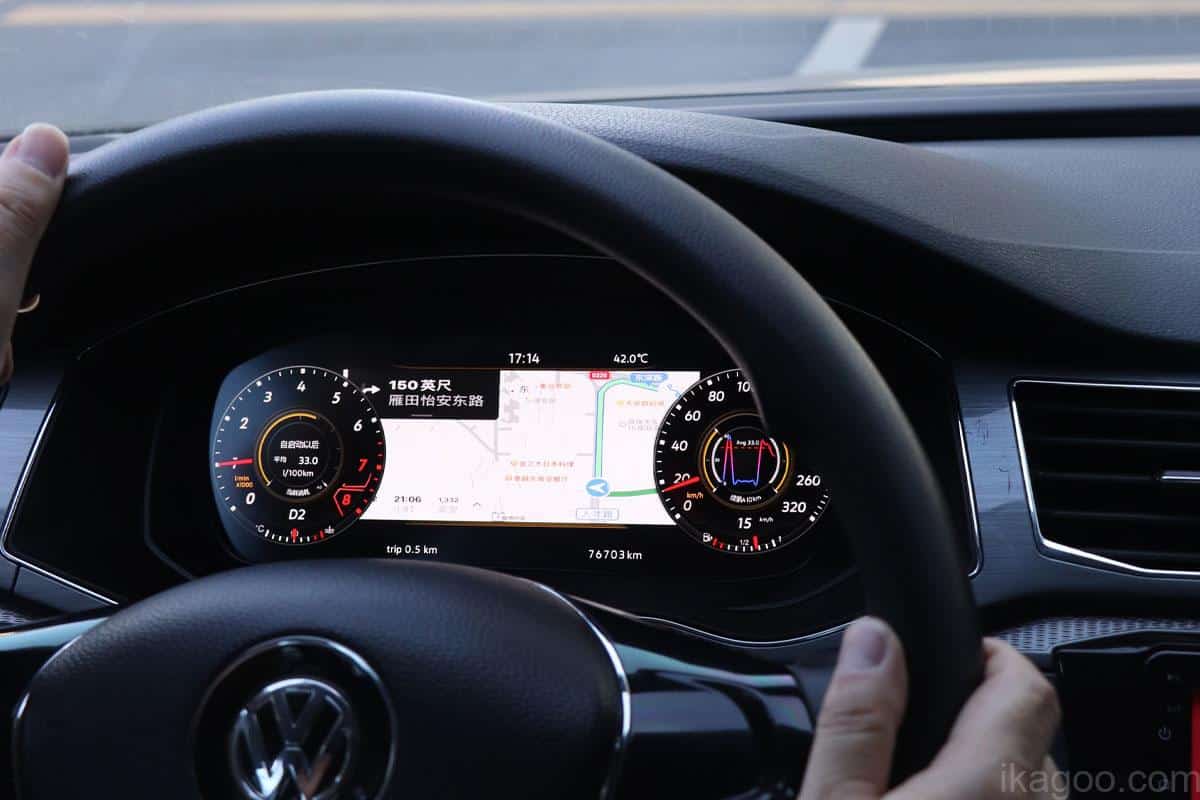
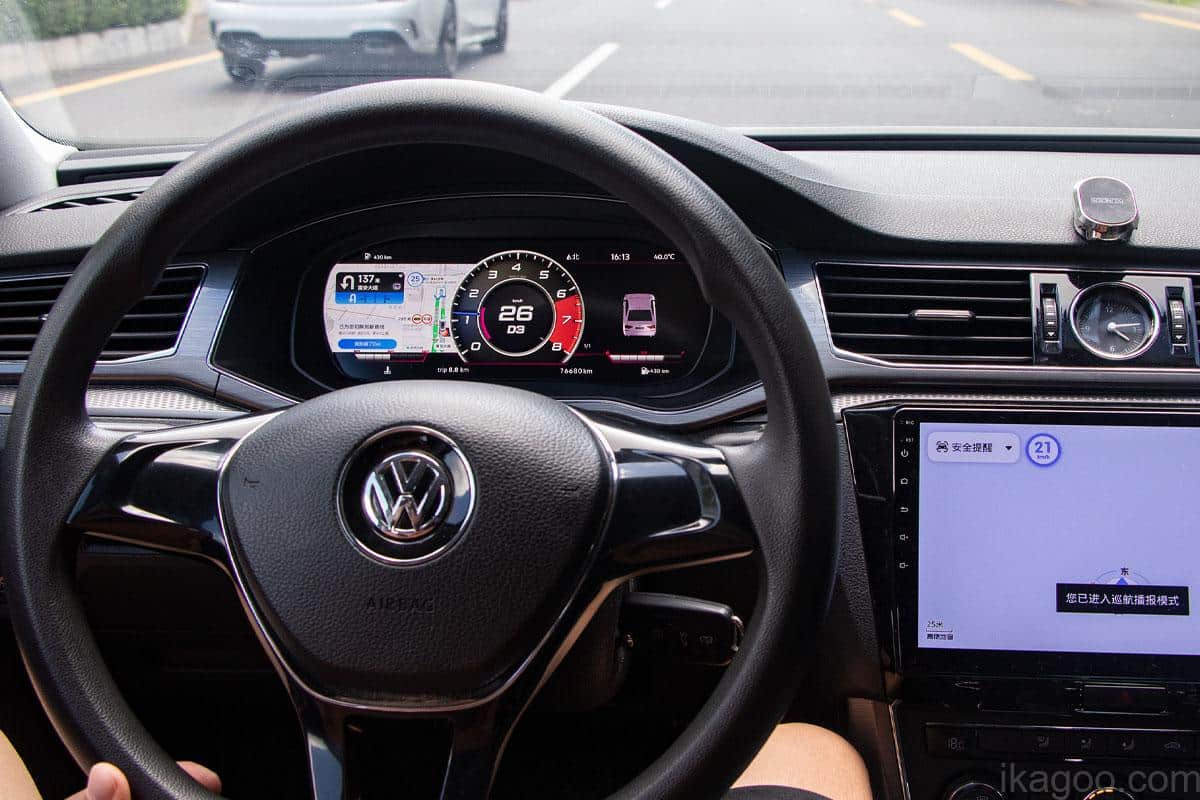
كيف تبدو نتائج عدادات Passat PQ الرقمية المكتملة؟
اطلب أولاً — نؤكد النسخة الصحيحة قبل الشحن
قدّم طلبك أولاً. بعد إتمام الشراء، أرسل لنا صورة واضحة للعدادات الأصلية ولوحة القيادة مع سنة الطراز وموضع عجلة القيادة. يراجع iKAGOO تكوين السيارة قبل الشحن ويجهّز النسخة الصحيحة لطلبك. تفضل التحقق أولاً؟ يمكنك أيضًا إرسال الصور قبل الطلب.








Add comment
يجب أنت تكون مسجل الدخول لتضيف تعليقاً.