


ترقية نظام المعلومات والترفيه بورش ماكان 2014–2024: CarPlay أم شاشة مزدوجة 24.6 بوصة؟
ترقية نظام المعلومات والترفيه في بورش ماكان 2014–2024: هل تستحق الترقية؟
ربما لا يوجد شيء خطير حقًا في سيارتك ماكان. لا تزال القيادة جيدة، والمقصورة لا تزال تبدو متينة، وقد لا تكون لديك أي نية لاستبدال السيارة. لكن في كل مرة تبدأ فيها رحلة، تلاحظ نفس نقطة الضعف: يبدو نظام المعلومات والترفيه أقدم من بقية السيارة.
عادةً ما تبدأ عملية اتخاذ القرار من هنا. ليس بحجم الشاشة أو الذاكرة العشوائية، بل بسؤال أبسط: هل يستحق الأمر إنفاق المال لتحديث سيارة ماكان تحبها بالفعل؟
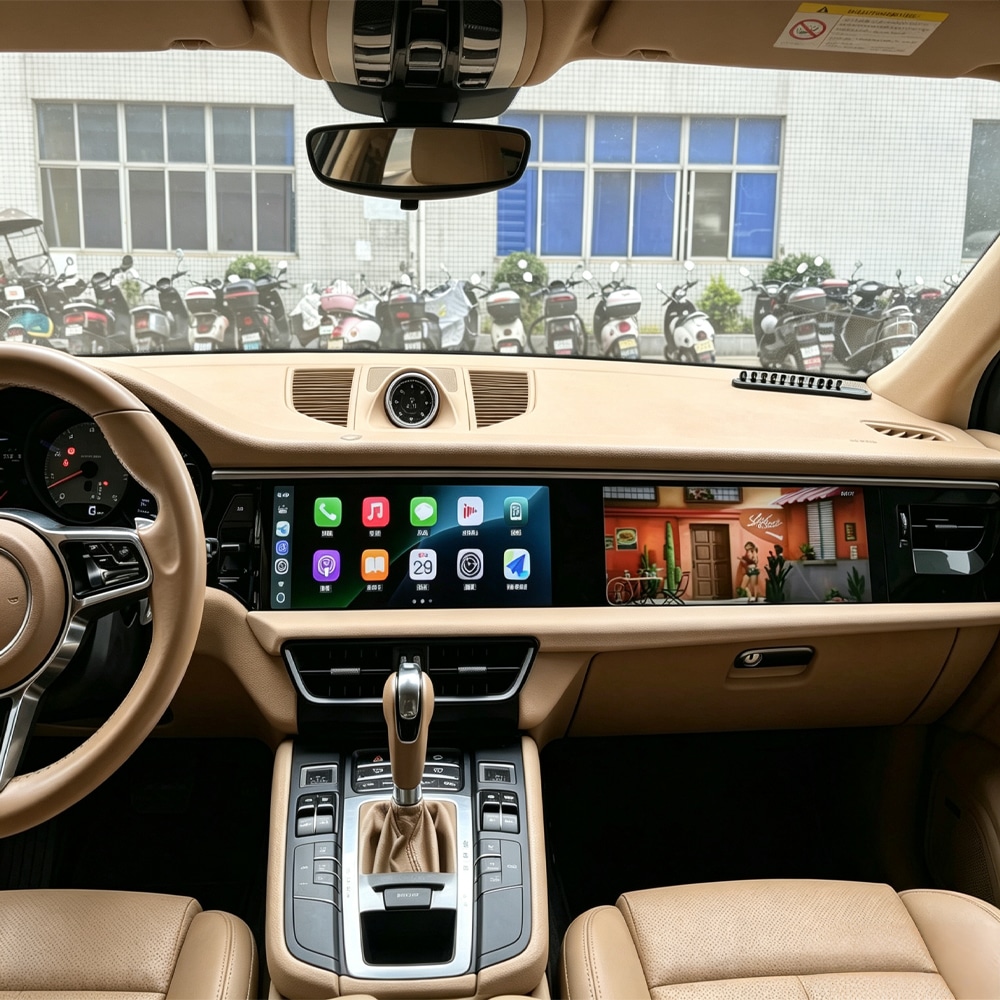
ما الذي سيتغير فعليًا بعد ترقية نظام المعلومات والترفيه في بورش ماكان؟
يجب أن تحل الترقية المفيدة مواقف تواجهها بالفعل. هذه هي اللحظات التي يلاحظ فيها مالكو ماكان عادةً الفرق.
تستخدم خرائط Google أو Waze كل يوم
تغادر المنزل، وتدخل عنوانًا على هاتفك، وتثبّت الهاتف في مكان قريب من لوحة القيادة، وتوصل الصوت ثم تقسّم انتباهك بين الهاتف ونظام PCM الأصلي.
مع CarPlay أو Android Auto على شاشة أكبر، ينتقل مسارك وموسيقاك ومكالماتك إلى واجهة مركزية واحدة. الفائدة ليست هائلة مرة واحدة—بل هي إزالة احتكاك صغير كل يوم.
تقود ساعتين أو ثلاث ساعات وتبدأ الشاشة الأصلية في الشعور بأنها صغيرة
في رحلة أطول، من المرجح أن تستخدم إرشادات المسار، والموسيقى، والمكالمات، والبحث عن الوجهات بشكل متكرر. هنا تصبح الشاشة الأوسع أكثر فائدة مما تبدو في صورة المنتج.
قد يكون من الأسهل قراءة التقاطعات والطرق المحيطة وعناصر التحكم في الوسائط دون الاعتماد على الهاتف كشاشة الملاحة الرئيسية.
لا تزال سيارة ماكان تبدو جيدة—فقط الإلكترونيات تبدو قديمة
قد تعرف بالفعل تاريخ الصيانة، وتثق بالمحرك وناقل الحركة، وتحب طريقة قيادة السيارة وليس لديك رغبة في البدء من جديد بسيارة مستعملة أخرى.
في هذه الحالة، يمكن أن يغيّر تحسين الجزء من المقصورة الذي تراه كل يوم شعورك بقدم السيارة دون تغيير السيارة نفسها.
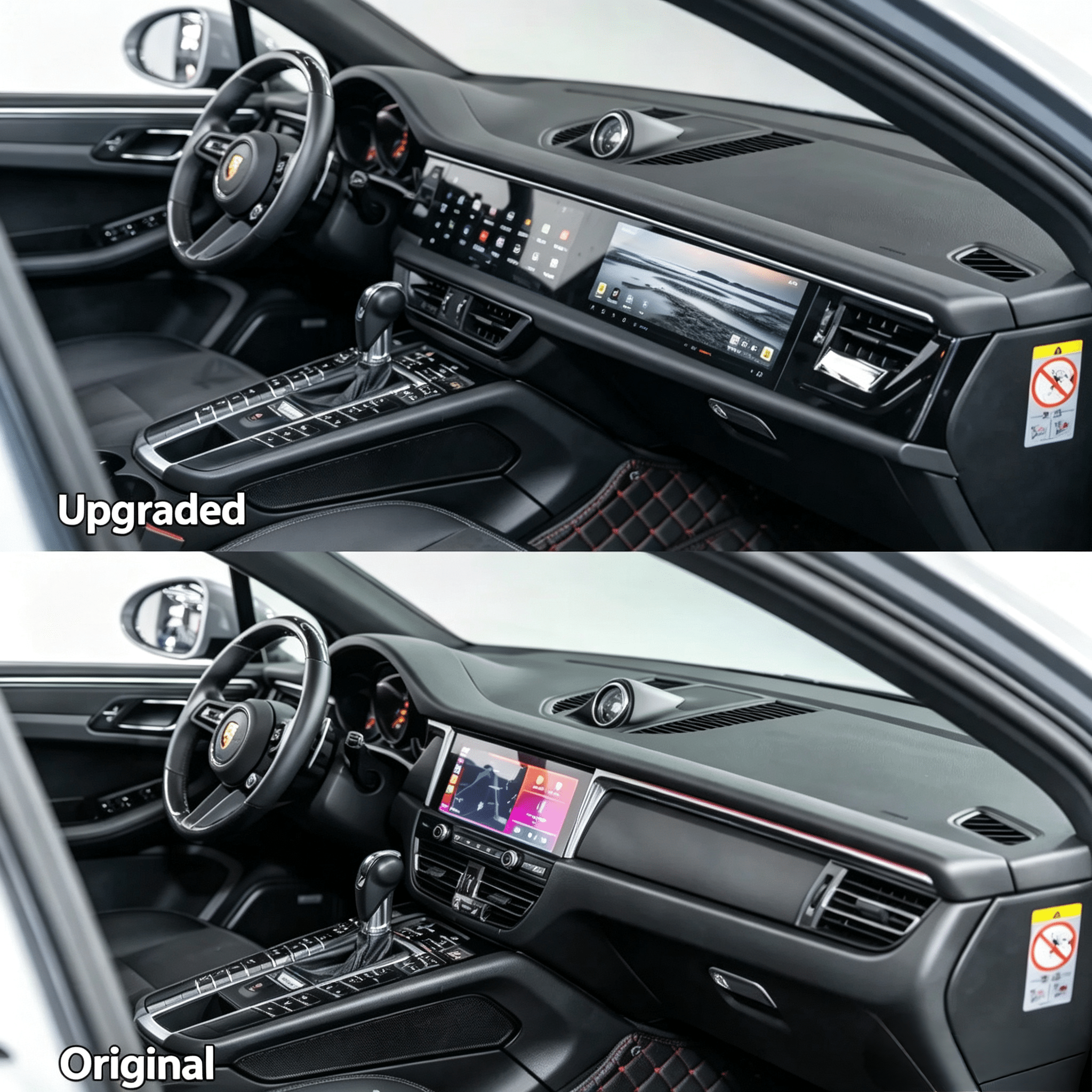
هل ترقية نظام الترفيه في بورش ماكان تستحق المال بالنسبة لك؟
ليس كل مالك ماكان يحتاج إلى تحويل كامل للوحة القيادة. تصبح عملية الشراء أكثر منطقية عندما تحل الترقية مشكلة حقيقية في الملكية.
من المحتمل أن يكون منطقيًا إذا...
- كنت تخطط للاحتفاظ بماكان لعدة سنوات أخرى.
- تستخدم بانتظام خرائط جوجل أو Waze أو Spotify أو إجراء مكالمات هاتفية أثناء القيادة.
- لا تحب استخدام حامل الهاتف كشاشة الملاحة الأساسية.
- السيارة نفسها لا تزال تبدو جيدة، لكن تقنية لوحة القيادة تبدو قديمة.
- تريد أن تبدو المقصورة أحدث بشكل ملحوظ، وليس مجرد إضافة صندوق CarPlay مخفي واحد.
- تفضل تحسين سيارة معروفة بدلاً من استبدالها فقط بسبب إلكترونيات أحدث.
قد لا تحتاج إليها بعد إذا...
- كنت تبيع السيارة قريبًا.
- نادرًا ما تستخدم الملاحة أو تكامل الهاتف.
- تفضل بشدة الحفاظ على لوحة القيادة أصلية تمامًا من المصنع.
- نظام PCM الأصلي يلبي احتياجاتك بالفعل.
- تريد فقط وظيفة CarPlay أساسية جدًا ولا تهتم بتغيير مظهر قمرة القيادة.
هذا التمييز مهم لأن الخيار الأغلى ليس تلقائيًا هو الأفضل. نظام الشاشة المزدوجة الكامل يكون منطقيًا فقط عندما تقدر مساحة الشاشة الإضافية، وبيئة أندرويد والتحول البصري بما يكفي لاستخدامها.
CarPlay أو شاشة أندرويد أو شاشة مزدوجة 24.6 بوصة: أي ترقية ماكان يجب أن تختار؟
What Does the Full Macan Screen Upgrade Feel Like in Real Use?
Your Phone Is Doing Most of the Work
The Macan drives well, but navigation happens on a phone, music is controlled through a smaller interface and the original dashboard reminds you that the vehicle is from an earlier infotainment generation.
Nothing is necessarily broken. It simply feels less convenient than the rest of your digital life.
The Dashboard Becomes the Main Interface Again
Navigation can live on the main screen, music and calls are easier to reach, and you no longer need the phone to visually dominate the dashboard.
If you choose the full-width route, the change is also visual: the cabin feels closer to a newer-generation vehicle each time you get in.
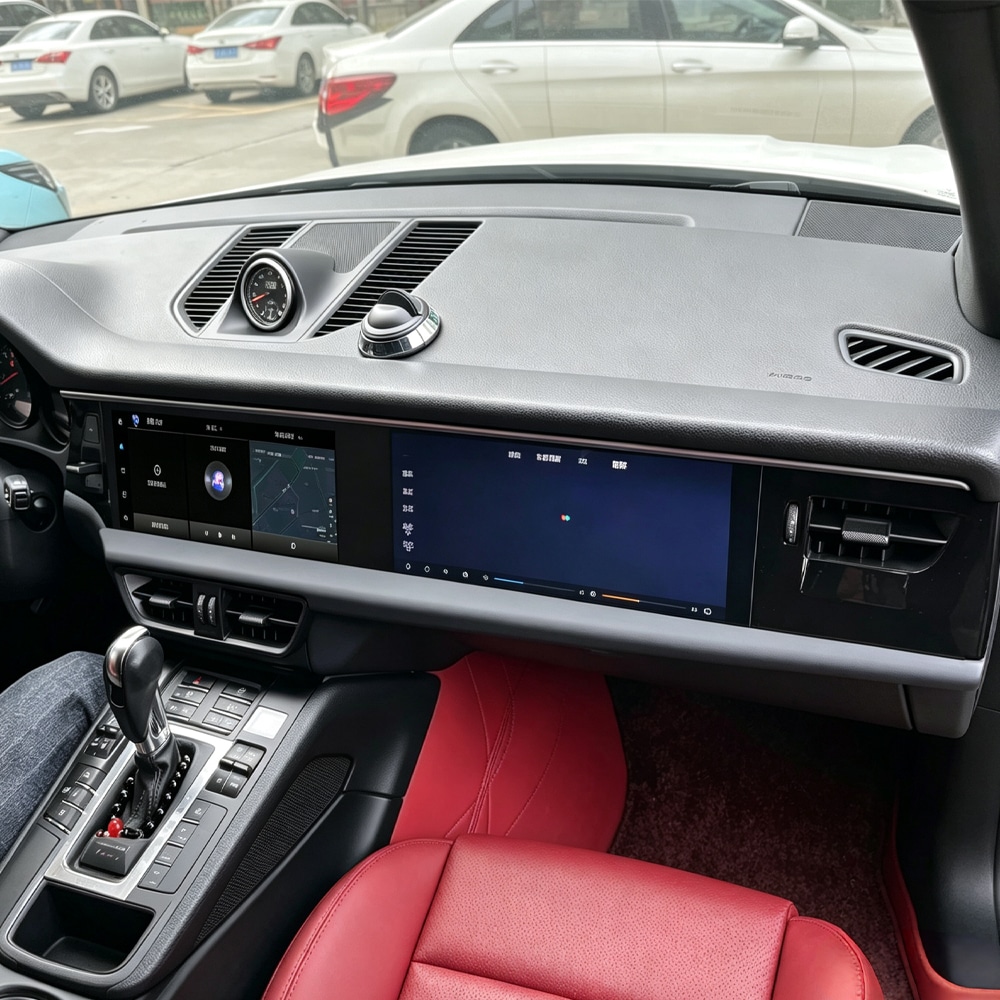
Which Porsche Macan Years Can Use the Current iKAGOO Upgrade Routes?
Porsche Macan 2014–2017
Current iKAGOO route uses a wide two-screen layout with approximately 12.3 + 12.3 بوصة, creating a combined 24.6-inch class cockpit appearance.
- الإصدارات ذات المقود الأيسر والمقود الأيمن
- CarPlay و Android Auto
- منصة أندرويد
- 4GB+64GB or 8GB+256GB
- Factory-camera retention supported with the correct configuration
Porsche Macan 2018–2024 ICE/Petrol
Current iKAGOO route uses an approximately 24.6-inch wide display with wireless CarPlay/Android Auto and an Android environment.
- الإصدارات ذات المقود الأيسر والمقود الأيمن
- شاشة 1920 × 720
- 4GB+64GB or 8GB+256GB
- Factory reverse-camera support
- Applicable 360° camera support after confirmation
What Should Be Checked Before You Buy?
Compatibility is where a convincing product page often becomes a disappointing installation. The safest approach is to check the actual vehicle instead of assuming that every Macan from the same year is identical.
This is one area where seller quality matters. The more complete the upgrade, the more important it becomes that someone checks the actual vehicle before shipment instead of simply sending a box labelled “Macan.”
What Are the Real Risks of a Porsche Macan Infotainment Upgrade?
The main risk is not that every aftermarket screen is unreliable. The bigger risk is buying an integrated product without knowing who will help if the installation or electronics do not behave as expected.
Wrong trim structure, audio interface, camera configuration or CANBUS route can create problems that have nothing to do with screen quality itself.
Loose plugs, incorrect settings, poor cable routing or failure to test sleep/wake behaviour can create faults after installation.
Installing random firmware from another hardware version can create a problem that did not exist before.
Even a small future problem becomes expensive if nobody can identify the original hardware, provide the correct component or explain what changed.
How Long Should a Porsche Macan Android Screen Last?
No responsible seller can promise an exact number of years. Automotive electronics are affected by cabin heat, direct sunlight, vehicle voltage, usage, installation quality, hardware condition and software handling.
A better buying question is: if something stops working in three years, will anyone still know which version I own and what part I need?
What Should Happen If the Macan Screen Stops Working?
The correct first response is not immediately: “replace the whole system.”
A black screen, missing audio, camera problem or CANBUS fault can come from very different causes.
Confirm the Exact Product and Vehicle
Start from the order, hardware version and original vehicle information.
Understand the Symptom
Video, photos, screen behaviour and connector information help narrow the problem.
Rule Out Settings and Installation
CANBUS, camera settings, audio routing, plugs and power should be checked before blaming the hardware.
Identify the Failed Component
The screen, main unit, harness, interface and other components should be treated separately where possible.
Choose the Appropriate Fix
The solution may be configuration, software, a replacement component, repair or another remedy depending on the actual fault.
What About After the 12-Month Warranty?
A warranty defines who pays for covered faults during a certain period. It should not be confused with the ability to provide technical help later.
With iKAGOO, the original order remains a reference for later troubleshooting, product-version identification, supported software guidance, parts investigation and repair coordination where available.
Out-of-warranty parts, shipping or repair costs may apply. This is continued support, not a promise of lifetime free replacement.
Before Buying a Macan Screen, Ask These Questions About the Seller
Can they tell you exactly what vehicle information they need before shipping?
If the answer is simply “Macan 2016, yes compatible,” that tells you very little about how the audio, camera, dashboard and vehicle interface were checked.
Can they identify the hardware again after the sale?
This becomes important later when a cable, display, CANBUS interface or software package is needed.
Do they diagnose before telling you to replace the whole unit?
A seller who understands the system should be able to distinguish at least between installation, configuration, software and hardware faults.
Are warranty, returns, shipping and support rules actually published?
A written policy is more useful than a promise made in a temporary marketplace chat.
Can you still contact the same business later?
Vehicle electronics are different from buying a phone case. Future product identification, software and spare-part access can matter years after the original purchase.
Should You Install a Porsche Macan Dual Screen Yourself?
If you regularly work with vehicle interiors, automotive connectors and CANBUS-based accessories, you may be comfortable following installation instructions.
For most buyers, professional installation is the safer choice because the complete system involves dashboard removal, harness routing, camera and audio checks, vehicle configuration and testing before the dashboard is closed.
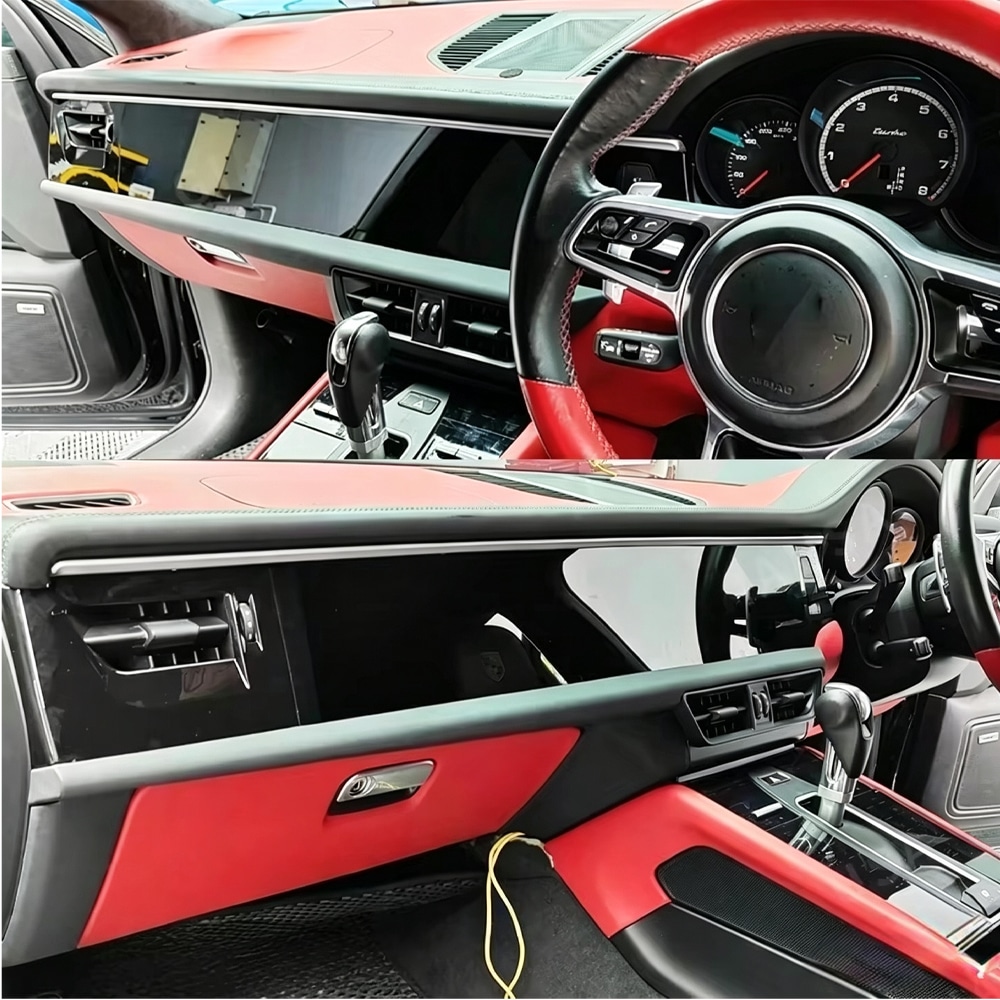
Porsche Macan Infotainment Upgrade FAQ
Is a Porsche Macan infotainment upgrade worth it?
It is most worthwhile when you plan to keep the vehicle, regularly use navigation and phone functions, and the infotainment is now the main part of the car that feels outdated.
Should I upgrade if my factory PCM still works?
Working and satisfying are not the same thing. If the original system still gives you everything you need, there is no strong reason to replace it. If you constantly rely on your phone because the PCM no longer suits your daily use, an upgrade becomes easier to justify.
Is CarPlay enough for an older Macan?
For many owners, yes. If your main need is Maps, music and calls, a CarPlay-focused solution may be enough. The complete dual-screen route makes more sense when you also want a large visual transformation and Android functionality.
Which Porsche Macan years are covered?
Current iKAGOO product routes cover the 2014–2017 Macan and selected 2018–2024 ICE/petrol Macan configurations. Final fitment depends on the actual vehicle equipment.
Does it fit Macan S, GTS, Turbo or Macan T?
These trims can fall within the supported year groups, but trim name alone is not enough to approve compatibility. The original dashboard, PCM, audio and camera configuration still need to be checked.
Does it work with the Macan Electric?
No. The current 2018–2024 route discussed here is for selected ICE/petrol configurations, not the newer Macan Electric architecture.
هل ستظل كاميرا الرجوع الخلفية المثبتة في المصنع تعمل؟
Factory reverse-camera retention is supported when the correct vehicle configuration and interface are matched. Applicable 360° systems should be confirmed before shipment.
What if my Macan has BOSE?
Tell the seller before the system is prepared. Factory amplified audio can change the connection route and should be part of the compatibility check.
How long will the new screen last?
No fixed lifespan can responsibly be guaranteed. Heat, voltage, installation quality, usage and hardware condition all affect automotive electronics. Long-term support and the ability to identify replacement components are therefore important buying considerations.
What if it breaks after the warranty?
The original order can still be used to identify the product, investigate the problem and check available software, parts or repair options. Out-of-warranty costs may apply.
Should I choose 4GB+64GB or 8GB+256GB?
For normal CarPlay, Android Auto, Maps and music, 4GB+64GB may be enough. Choose 8GB+256GB if you expect heavier Android app use, offline maps and more local storage.
Check the Product, Compatibility and Support Before You Buy
If the Macan Still Feels Right, You May Not Need a Different Car—Only a Better Interface.
The strongest reason to upgrade is not that a 24.6-inch screen exists. It is that you repeatedly notice the limitations of the original system in a vehicle you otherwise still want to keep.
If that describes your Macan, the next step is not immediately to buy. First confirm the year, steering position, PCM, camera and audio configuration. Then choose the smallest upgrade that actually solves your problem.








Add comment
يجب أنت تكون مسجل الدخول لتضيف تعليقاً.