


عرض السرعة الرقمية وعدد الدورات في الدقيقة (RPM)
تجعل العدادات الرقمية والرسومية الكبيرة من السهل التعرف على معلومات السرعة والمحرك دون الحاجة إلى الاعتماد على شاشة المعلومات المركزية الصغيرة.
| الوزن | 8 كيلوجرام |
|---|---|
| الأبعاد | 48 × 38 × 28 سنتيميتر |
| سيارة الدعم | 2015-2018 لطراز تويوتا هايلاندر، 2018-2019 لطراز تويوتا هايلاندر |
| توافق المنتج | التوصيل والتشغيل |
| أصل المنتج | ليس منتجًا أصليًّا حقيقيًّا |


$780.00 السعر الأصلي هو: $780.00.$680.00السعر الحالي هو: $680.00.

نحن نتولى دفع ضريبة القيمة المضافة ورسوم الاستيراد السارية على الطلبات المؤهلة من دول الاتحاد الأوروبي والولايات المتحدة الأمريكية. التوفير التقديري: $120-$280 .
تكلفة الشحن تُدفع بشكل منفصل. يتم حساب تكلفة الشحن الدقيقة وفقًا للوجهة، وتظهر في سلة التسوق الخاصة بك قبل إتمام عملية الدفع.
يتم تأكيد الشحن النهائي من عنوان التسليم الخاص بك عند إتمام الدفع.
مراجعة التوافق، وحماية كاملة للتوافق، وضمان لمدة 12 شهراً على الأجهزة، ودعم مستمر بعد التثبيت.
 حماية استرداد الأموال بالكامل
ضمان التوافق
هل تم التأكد من عدم توافق المنتج مع سيارتك؟ ستسترد المبلغ بالكامل.
→
حماية استرداد الأموال بالكامل
ضمان التوافق
هل تم التأكد من عدم توافق المنتج مع سيارتك؟ ستسترد المبلغ بالكامل.
→
 12-Month ضمان الأجهزة
تشمل الضمان تغطية الأجهزة خلال الأشهر الـ 12 الأولى.
→
الدعم ما بعد البيع على المدى الطويل
تظل الإرشادات المتعلقة بالبرمجيات، ودعم قطع الغيار، وتنسيق الإصلاحات مرتبطة بطلبك الأصلي.
→
12-Month ضمان الأجهزة
تشمل الضمان تغطية الأجهزة خلال الأشهر الـ 12 الأولى.
→
الدعم ما بعد البيع على المدى الطويل
تظل الإرشادات المتعلقة بالبرمجيات، ودعم قطع الغيار، وتنسيق الإصلاحات مرتبطة بطلبك الأصلي.
→
هدفنا هو تجهيز طلبك بشكل صحيح قبل أن يغادرنا. نتحقق من التوافق، ونجهز الإعداد الصحيح، ونتواصل معك فقط إذا كان هناك ما يحتاج إلى تأكيد.
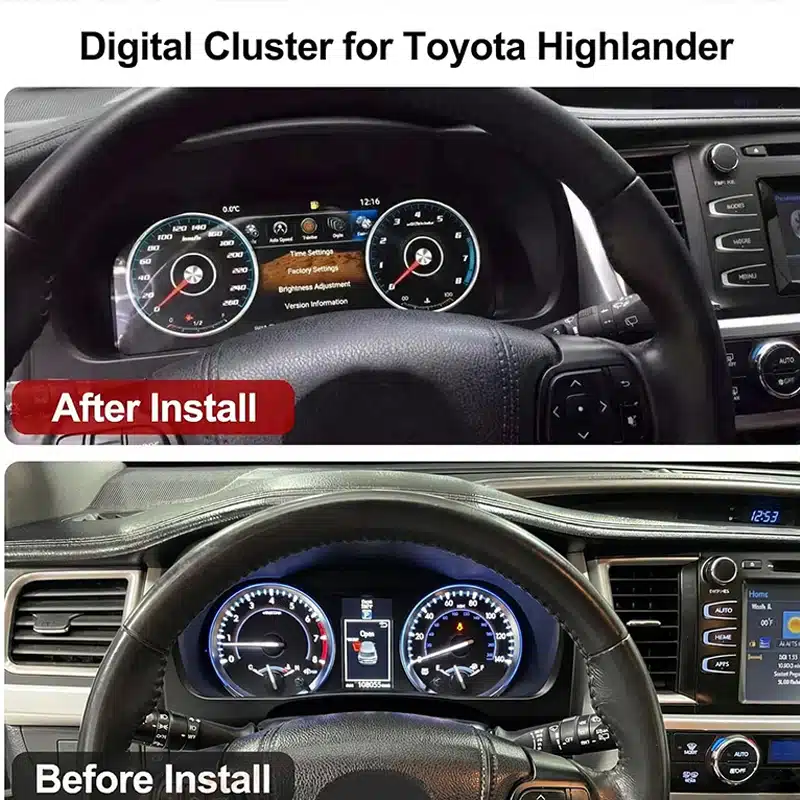
تحديث iKAGOO الرقمي لمقصورة القيادة المخصص لكل طراز سيارة
ال لوحة العدادات الرقمية في سيارة تويوتا هايلاندر يستبدل مجموعة العدادات التقليدية بشاشة لينكس عريضة مقاس 12.3 بوصة بدقة 1920×720، مما يمنح سيارتك «هايلاندر» مقصورة قيادة أكثر أناقة وعصرية تركز على راحة السائق.
يمكنك الاطلاع على السرعة، وعدد الدورات في الدقيقة، والمسافة المقطوعة، ومعلومات الرحلة، وبيانات الوقود، ومعلومات ضغط الإطارات، وكذلك التحذيرات المدعومة الخاصة بالمركبة، من خلال واجهة رقمية واضحة يسهل قراءتها أثناء القيادة اليومية.
هذه ترقية شاملة لمجموعة العدادات. وهي لا تحل محل جهاز الراديو المركزي، كما أنها ليست وحدة مخصصة لـ CarPlay فقط، مما يتيح لك تحديث شاشة السائق دون تغيير نظام المعلومات والترفيه بالكامل.
توفر الشاشة العريضة بدقة 1920×720 مساحة أكبر لعرض معلومات القيادة و تحسّن الرؤية من مقعد السائق.
اطلع على معلومات السرعة المدعومة، وعدد الدورات في الدقيقة، والمسافة المقطوعة، والرحلة، والوقود، وضغط الإطارات، و معلومات التحذير، كل ذلك في شاشة واحدة مخصصة للسائق.
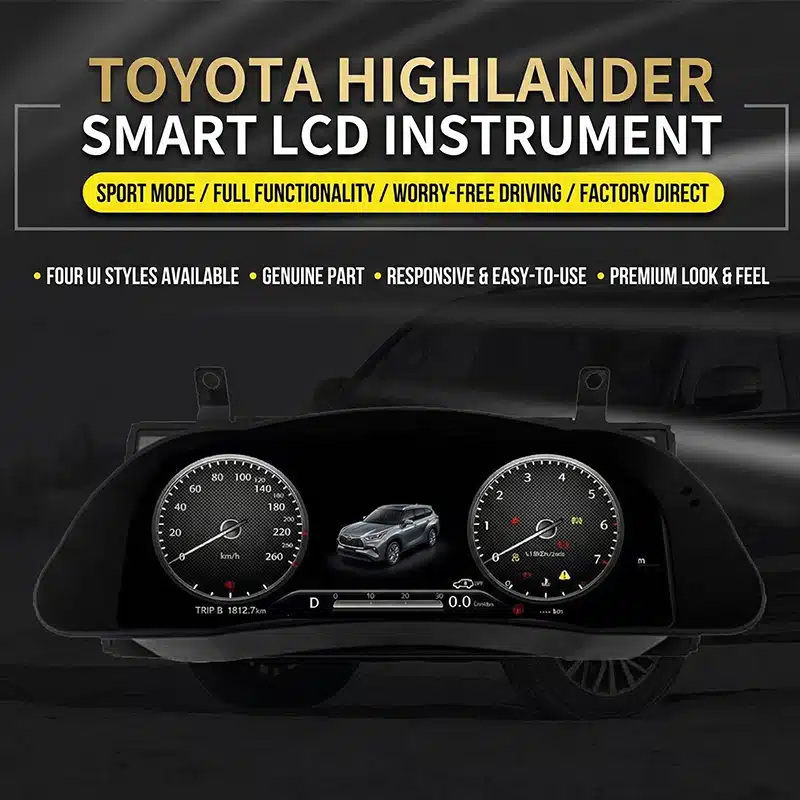
قم بتغيير مظهر لوحة العدادات لتناسب القيادة اليومية، أو الرحلات، أو المعلومات ذات الطابع الرياضي، أو الاستخدام على الطرق الوعرة.
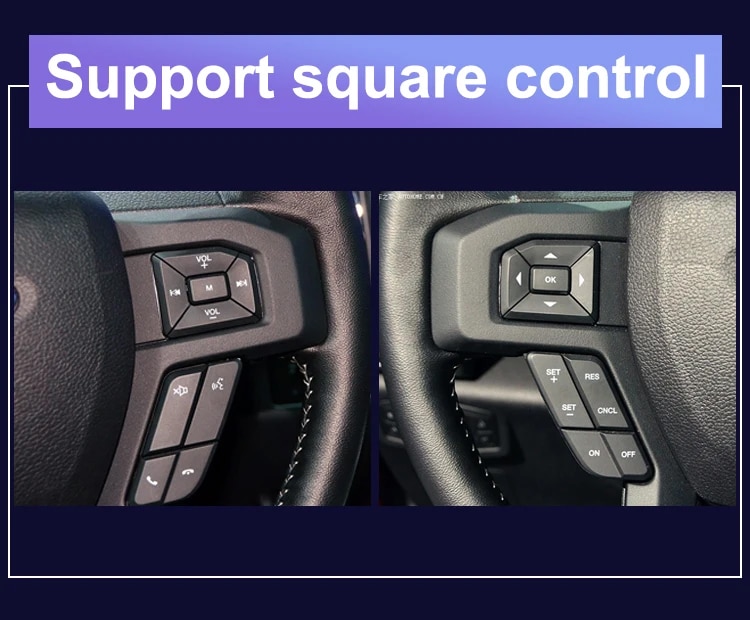
استخدم أزرار عجلة القيادة الأصلية المدعومة لتغيير صفحات العرض وتشغيل وظائف لوحة العدادات المتوافقة.
يتماشى الغطاء مع شكل لوحة أجهزة القياس في سيارة «هايلاندر» ليضفي مظهرًا نهائيًّا أكثر أناقة وتكاملًا.
تقوم iKAGOO بالتحقق من سنة الصنع، ولوحة العدادات، ومجموعة العدادات الأصلية، ونظام الدفع والتكوين الإقليمي قبل إعداد طلبك.
صُممت لوحة العدادات الرقمية هذه مقاس 12.3 بوصة لتتوافق مع طرازات تويوتا هايلاندر من أعوام 2015 إلى 2019. وهي تُعد ترقية رائعة للمالكين الذين يرغبون في الحصول على عداد سرعة رقمي أكبر، ومعلومات أكثر وضوحًا عن السيارة، وبيئة قيادة أكثر حداثة.
لإعداد النسخة الصحيحة، تقوم iKAGOO بالتحقق من سنة صنع سيارتك، وصورة لوحة العدادات، ومظهر لوحة العدادات الأصلية، ونوع المحرك (بنزين أو هجين)، وموضع عجلة القيادة، وسوق السيارة قبل الشحن. وهذا يساعدنا على تجهيز الشاشة والأسلاك والإعدادات المناسبة لطلبك.
قيمة الترقية اليومية
لا تكمن الفائدة الرئيسية في مجرد استبدال العدادات الميكانيكية بشاشة فقط، بل في جعل المعلومات التي تستخدمها يوميًا أسهل في القراءة، وأسهل في التنظيم، وأكثر متعة في العرض.
تجعل العدادات الرقمية والرسومية الكبيرة من السهل التعرف على معلومات السرعة والمحرك دون الحاجة إلى الاعتماد على شاشة المعلومات المركزية الصغيرة.
يمكن تنظيم المعلومات المدعومة المتعلقة بعدد الأميال المقطوعة، والرحلات، والوقود، ومدى السير، وضغط الإطارات، والتحذيرات في تصميم رقمي أكثر وضوحًا.
اختر من بين أنماط العرض المتاحة لإبراز العدادات الكلاسيكية، أو المعلومات الرياضية، أو بيانات الرحلة، أو عرضًا أبسط مخصصًا للقيادة اليومية.
تظل أزرار عجلة القيادة الأصلية المدعومة متاحة، مما يتيح لك تغيير صفحات لوحة العدادات والوصول إلى معلومات القيادة بطريقة أكثر سهولة.
قم بتحديث الجزء من المقصورة الموجود أمامك مباشرةً دون استبدال جهاز الراديو أو تغيير نظام الكونسول المركزي بالكامل.
تستخدم iKAGOO معلومات سيارتك وصورها للمساعدة في إعداد التكوين المناسب للوحة العدادات وحل التوصيل المطابق.
دعم الوظائف الأصلية للمركبة
مع استخدام الإصدار الصحيح للسيارة، والأسلاك المطابقة، والتركيب الصحيح، فقد صُممت لوحة العدادات بحيث تستمر في عرض المعلومات المدعومة التي توفرها سيارتك من طراز هايلاندر.
تستمر معلومات سرعة السيارة وسرعة المحرك في الظهور عبر واجهة العدادات الرقمية الجديدة.
تظل معلومات عداد المسافة المقطوعة ومعلومات الرحلة والرحلات المدعومة متاحة بعد تجهيز لوحة العدادات وتهيئتها بشكل صحيح.
يستمر عرض مستوى الوقود ومعلومات الاستهلاك المدعومة والمسافة المتبقية لتخطيط الرحلات اليومية.
تظل معلومات ضغط الإطارات المدعومة وتحذيرات الإطارات مرئية عبر الشاشة الرقمية.
تستمر تحذيرات المحرك، والفرامل، وحزام الأمان، وحالة السيارة في الظهور حتى بعد التثبيت الصحيح.
تظل أزرار عجلة القيادة الأصلية المدعومة متاحة لتشغيل صفحات لوحة العدادات والإعدادات المتوافقة.
تتيح الإصدارات المدعومة اختيار وحدات القياس MPH أو KM/H، بالإضافة إلى وحدات قياس درجة الحرارة أو ضغط الإطارات ذات الصلة.
يمكن الاستمرار في عرض معلومات نظام التحكم التلقائي في السرعة (ACC) ونظام التحذير من الخروج عن المسار في المركبات التي تم تجهيزها أصلاً بهذه الوظائف.
اطلع على تفاصيل الترقية
استكشف شكل لوحة العدادات، ومظهرها داخل السيارة، وتصميمات واجهات المستخدم المتاحة لفهم كيفية تأثير التحديث على بيئة القيادة في سيارة هايلاندر.


تقييمات الشراء من iKAGOO
تساعدك تقييمات iKAGOO الثلاثة هذه على تحديد ما إذا كانت عملية الترقية تتوافق مع خططك المتعلقة بملكية السيارة، وتكوين سيارتك، و طريقة التركيب التي تفضلها.
توفر هذه الترقية قيمة كبيرة في الاستخدام اليومي لمالكي سيارات «هايلاندر» الذين يخططون للاحتفاظ بالسيارة ويرغبون في الحصول على تجربة معلومات للسائق أكثر وضوحًا وحداثة.
قد تكون الحاجة إلى الترقية أقل عندما تعمل لوحة العدادات الأصلية بشكل جيد وتفضل الحفاظ على المقصورة الداخلية في حالتها الأصلية تمامًا.
يتم تقييم هذا المنتج في إطار عمل «ضرورة الترقية من iKAGOO»، الذي يأخذ في الاعتبار حالة النظام الأصلي، تحسين الاستخدام اليومي، والقيمة على المدى الطويل للملكية، والبدائل المتاحة، والقيمة العملية للترقية.
اقرأ إطار عمل «ضرورة الترقية» الخاص بـ iKAGOOتم تصميم الهيكل المخصص لطراز «هايلاندر»، ومسار التوصيل المطابق، و وظائف بيانات السيارة المدعومة، بحيث تمنح الترقية شعوراً بالتكامل مع السيارة بدلاً من أن تبدو كشاشة إضافية منفصلة.
تشمل جودة التوافق التركيب المادي، ومعلومات المركبة، ووسائل التحكم الأصلية، وعرض التحذيرات، وتصميم الواجهة، والتكامل العام. ولا يعني ذلك إزالة نسبة مئوية مطابقة من الوظائف الأصلية.
تستند هذه النتيجة إلى إطار عمل «iKAGOO Original Vehicle Compatibility» . ويقوم هذا الإطار بتقييم استمرارية الوظائف الأصلية، ووسائل التحكم الأصلية، وتكامل بيانات السيارة والتحذيرات، والبنية المادية، والتفاعل على غرار التصميم الأصلي، وتكامل عملية التركيب.
تمثل النتيجة جودة التكامل الإجمالية لعملية التحديث. ولا يعني ذلك أن النسبة المئوية نفسها من وظائف المصنع قد فُقدت أو تم الاحتفاظ بها.
اقرأ إطار عمل التوافق مع المركبات الأصلي من iKAGOOيُنصح بالاستعانة بخدمات تركيب احترافية لأن العمل يتضمن تفكيك منطقة أجهزة القياس، ومطابقة الموصلات، وإعداد السيارة، و إجراء فحص شامل لسلوك مؤشرات التحذير والبيانات والطاقة.
يعكس مستوى التثبيت الأعلى حجم العمل الاحترافي المطلوب. ولا يشير ذلك إلى انخفاض جودة المنتج، أو انخفاض التوافق، أو انخفاض قيمة الترقية.
يتم تحديد مستوى التركيب هذا وفقًا لإطار عمل iKAGOO الخاص بصعوبة تركيب إلكترونيات السيارات. ويأخذ هذا الإطار في الاعتبار تفكيك لوحة العدادات، وتوصيلات الأسلاك، وتوجيه الكابلات، وتكوين شبكة CANBUS، واختبار الأداء الوظيفي، وسلوك نظام الطاقة، ومستوى الخبرة المطلوب من المُركِّب.
تصف صعوبة التثبيت الجهد المطلوب لإتمام عملية التثبيت بشكل صحيح. وهي لا تعني انخفاض جودة المنتج أو انخفاض قيمته عند الترقية.
اقرأ إطار عمل صعوبة التثبيت الخاص بـ iKAGOOاختر مسار الترقية المناسب
كل حل يلبي حاجة مختلفة. تساعدك هذه المقارنة على اختيار الخيار الذي يتناسب مع ما تريد تحسينه في سيارتك «هايلاندر».
| الخيار | ما الذي يتغير | الأكثر ملاءمة لـ | الاعتبار الرئيسي |
|---|---|---|---|
| مجموعة iKAGOO الرقمية | يستبدل مجموعة العدادات الأصلية بشاشة رقمية كاملة. | المالكين الذين يرغبون في الحصول على عدادات حديثة، وسمات قابلة للتحديد، ومعلومات أكثر وضوحًا عن القيادة. | يتطلب ذلك إجراءً تحضيريًّا خاصًّا بالمركبة وتركيبًا احترافيًّا. |
| إصلاح المجموعة الأصلية | يقوم بإصلاح مجموعة العدادات الأصلية الموجودة في المصنع. | المالكين الذين يفضلون المظهر الأصلي ويحتاجون فقط إلى تصحيح عيب موجود. | تحتفظ المجموعة التي تم إصلاحها بتصميم الشاشة الأصلي. |
| لوحة العدادات الأصلية المستعملة | يستبدل لوحة العدادات المعيبة بوحدة أخرى من الطراز الأصلي. | المالكين القادرين على الحصول على قطعة غيار أصلية مطابقة تمامًا. | قد يتطلب عدد الأميال، والترميز، والمواصفات، وحالة القطع مزيدًا من الاهتمام. |
| وحدة CarPlay | يضيف إمكانية الاتصال بالهاتف المدعومة إلى نظام المعلومات والترفيه المركزي. | يرغب المالكون بشكل أساسي في الحصول على وظائف الملاحة عبر الهاتف، والموسيقى، وإجراء المكالمات. | وهي لا تحل محل لوحة العدادات ولا تعمل على تحديثها. |
| وحدة رأس أندرويد | يُحدّث الشاشة المركزية ونظام الوسائط المتعددة. | المالكين الراغبين في الحصول على تطبيقات أندرويد وميزات الملاحة والوسائط المتعددة. | إنه منتج مختلف عن شاشة عرض أجهزة القيادة هذه. |
اكتشف المزيد من تفاصيل المنتج
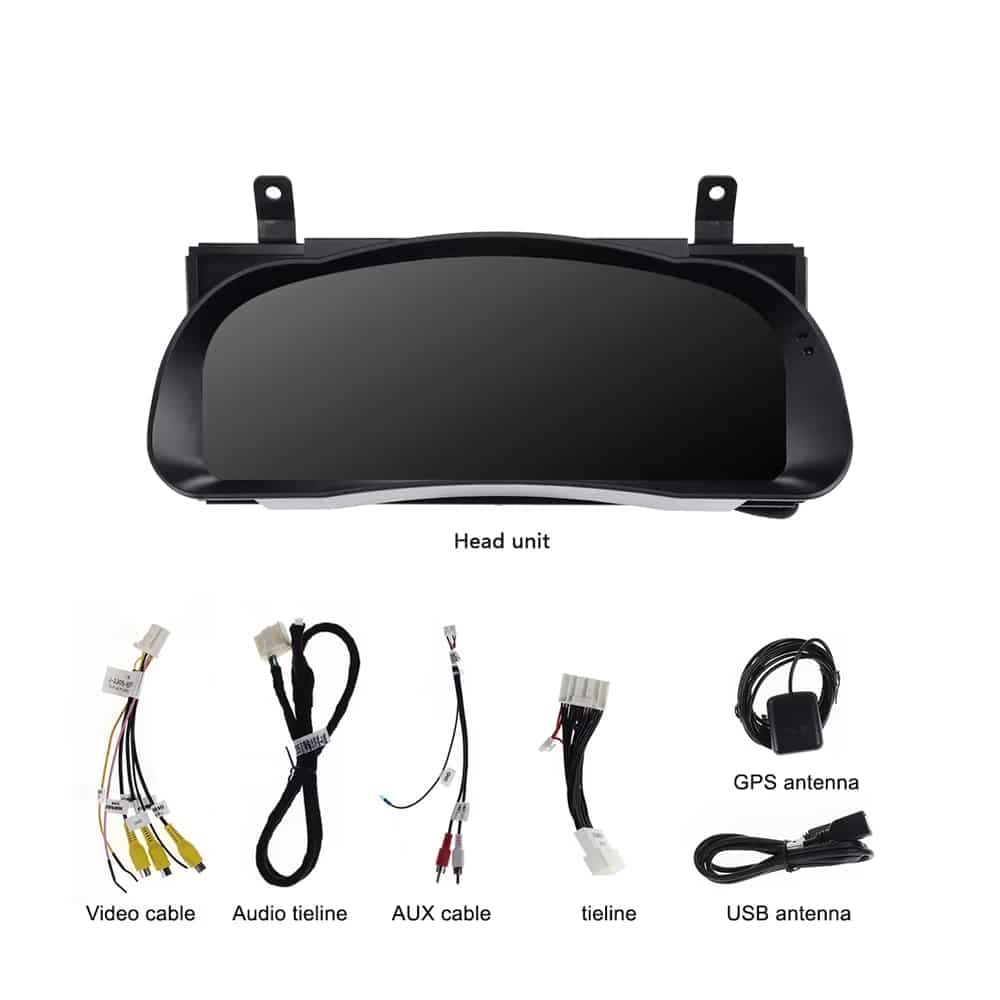
يرجى الاطلاع على خيارات الشاشة، والمجموعة المادية، والوصلات الخلفية، والأسلاك المرفقة، وأمثلة أزرار التحكم في عجلة القيادة قبل اختيار التكوين الذي تريده.
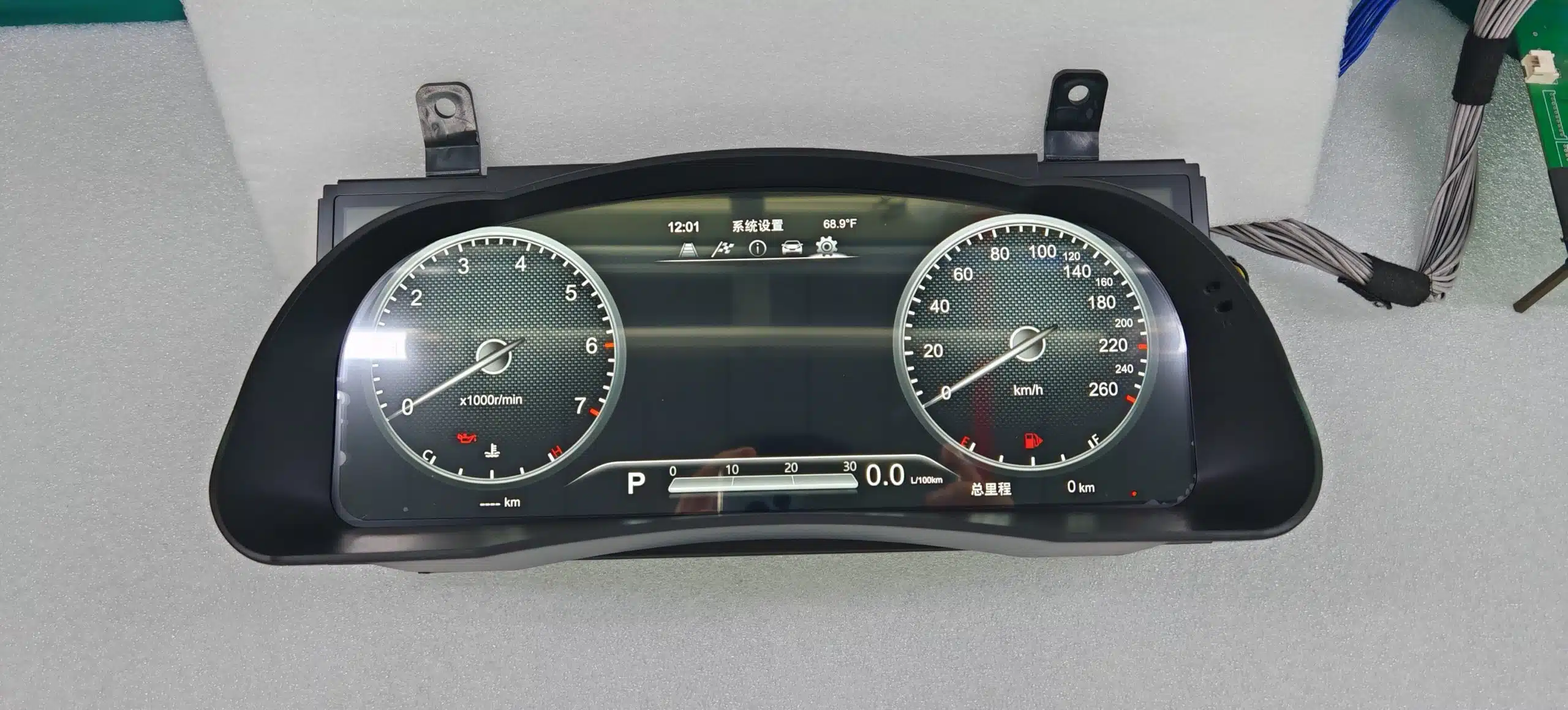
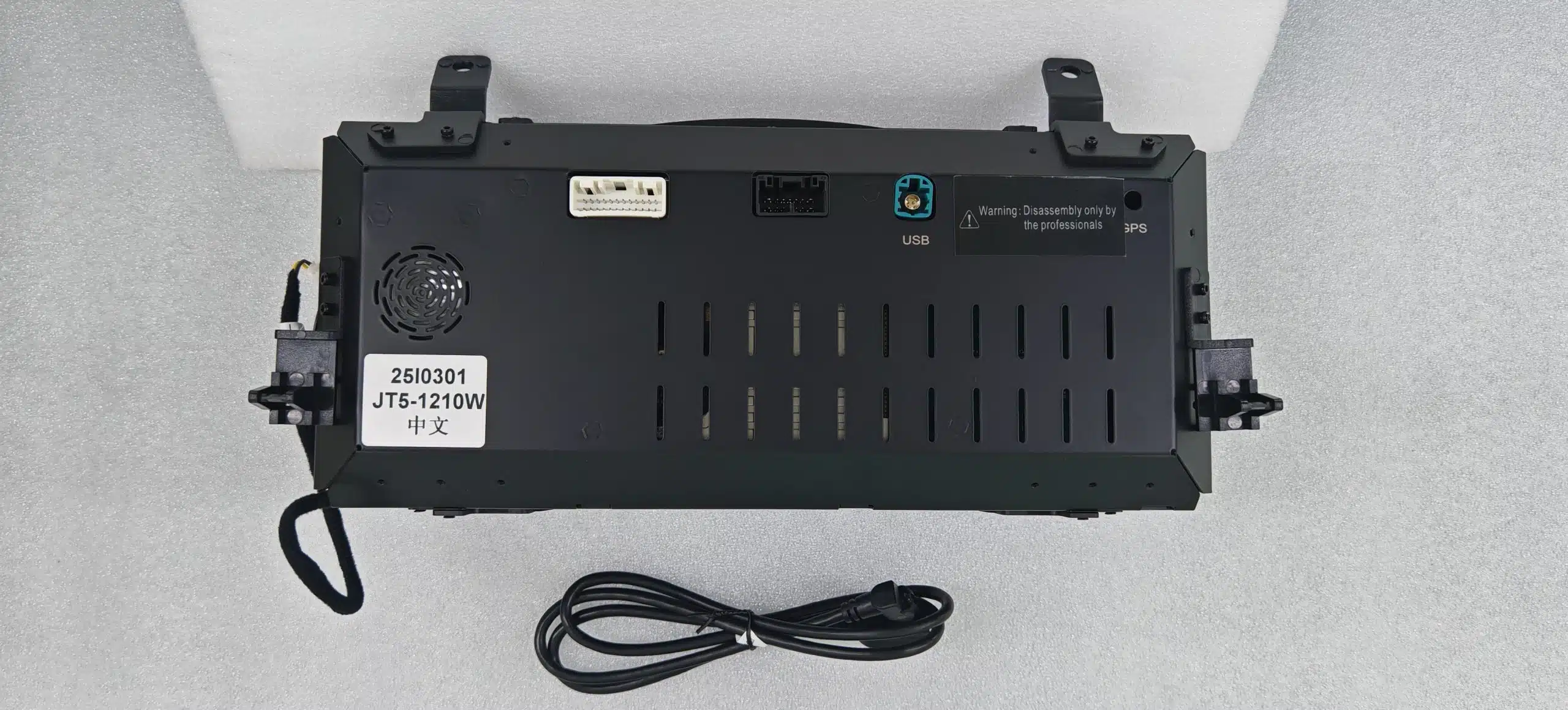
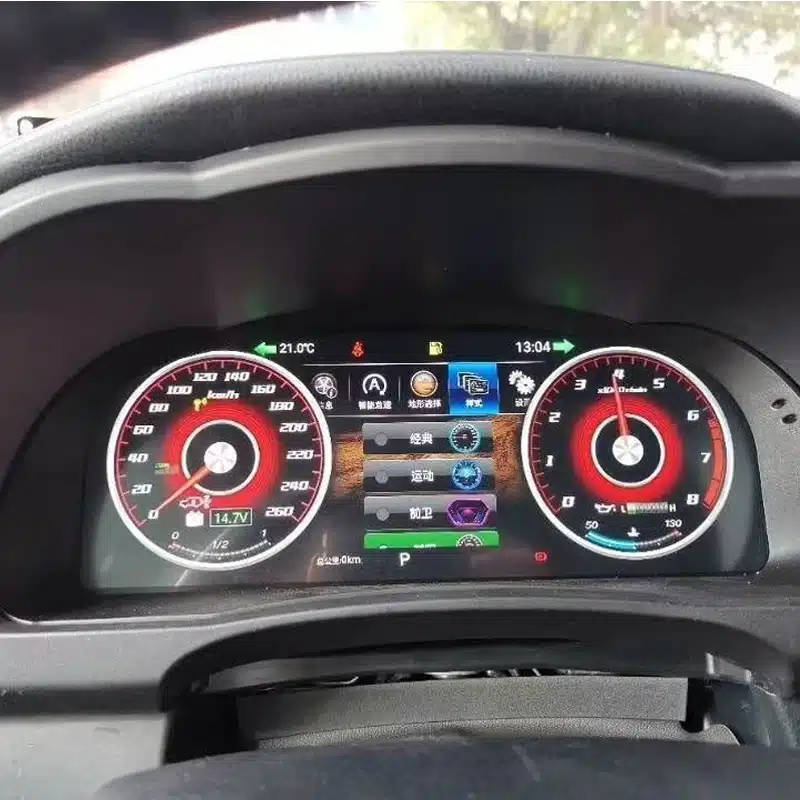
مواصفات المنتج
تركز هذه المجموعة على معلومات السيارة وشاشة السائق. ولا يُقصد بها أن تحل محل وظائف الوسائط المتعددة في وحدة التحكم الرئيسية التي تعمل بنظام أندرويد أو نظام CarPlay.
| نوع المنتج | لوحة عدادات رقمية كاملة مخصصة للسيارة |
|---|---|
| تطبيقات المركبات | تويوتا هايلاندر، الإصدارات المدعومة من 2015 إلى 2019 |
| حجم العرض | 12.3 بوصة |
| نوع العرض | شاشة العدادات الرقمية HD QLED |
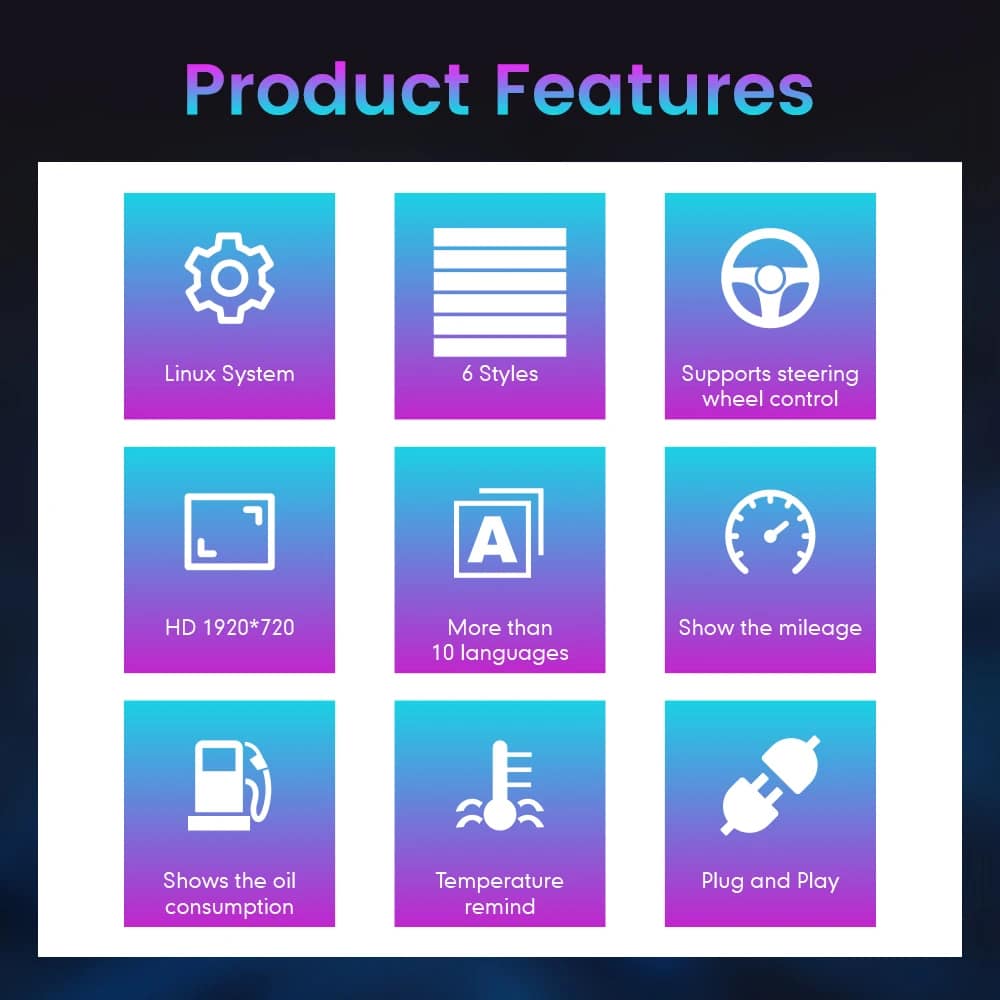
| القرار | 1920 × 720 |
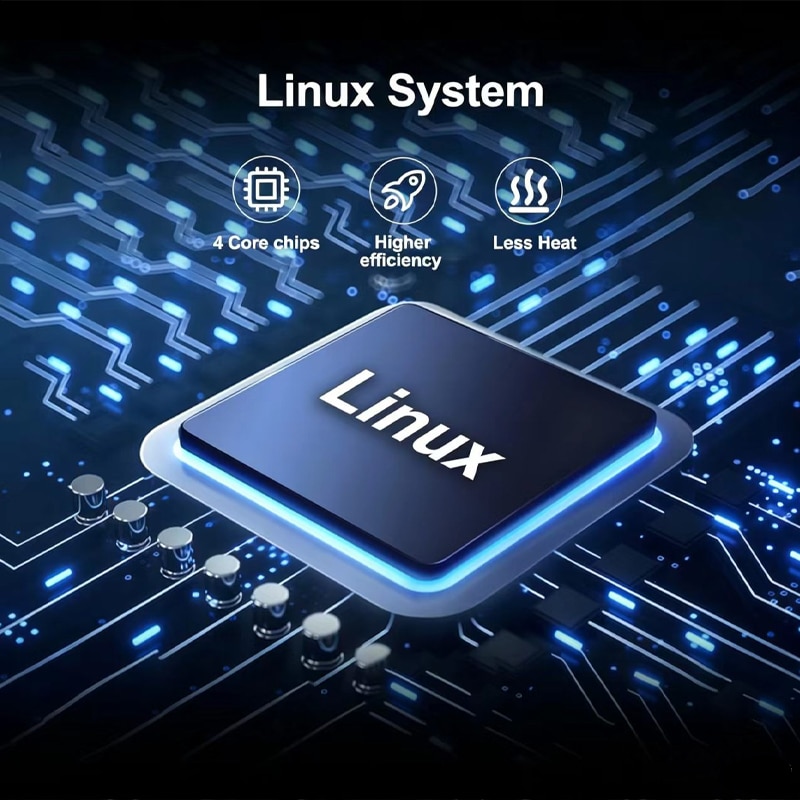
| نظام التشغيل | لينكس |
| تحسين الأداء | ما يصل إلى 60 إطارًا في الثانية |
| بدء التشغيل | تشغيل سريع لنظام لينكس مصمم للاستخدام مع الأجهزة |
| سمات العرض | ستة أنماط للواجهة يمكن الاختيار من بينها |
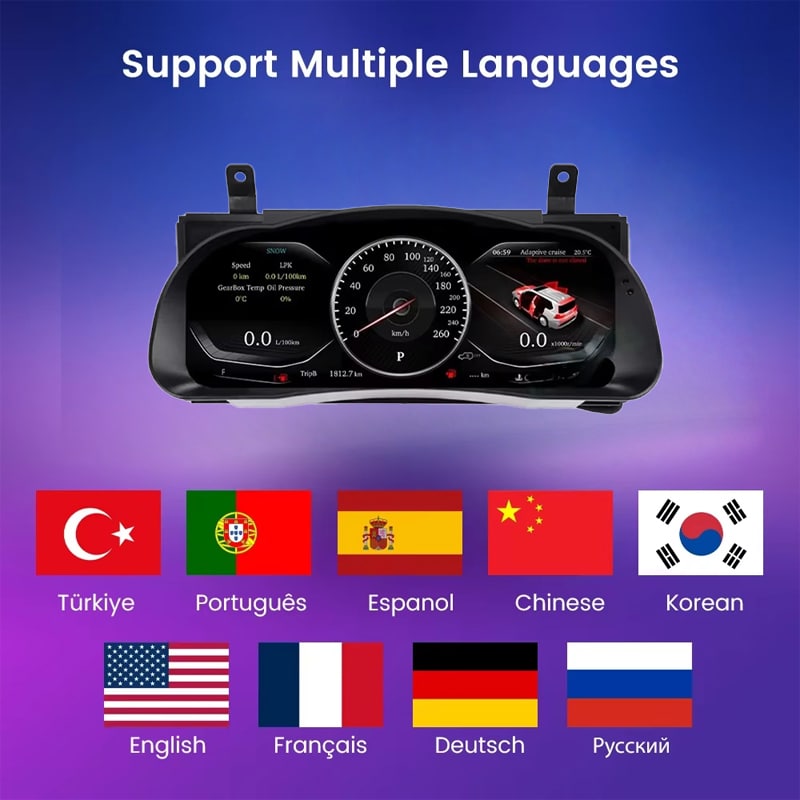
| اللغات | أكثر من 10 لغات مدعومة للواجهة؛ يرجى تحديد لغتك المفضلة عند الطلب |
| معلومات عن السيارة | السرعة المدعومة، عدد الدورات في الدقيقة، المسافة المقطوعة، الرحلة، الوقود، المدى، نظام مراقبة ضغط الإطارات (TPMS) و معلومات تحذيرات السيارة |
| الوحدات | إعدادات وحدات القياس المدعومة: ميل في الساعة (MPH) / كيلومتر في الساعة (KM/H) / درجة الحرارة وضغط الإطارات |
| عناصر التحكم الأصلية | دعم التشغيل الأصلي لأزرار التحكم الموجودة على عجلة القيادة |
| نطاق التشغيل المحدد | من -40 درجة مئوية إلى +80 درجة مئوية |
| طريقة التوصيل | مسار توصيل مخصص وملائم للمركبة، مصمم لتجنب القطع المتعمد للأسلاك الرئيسية الأصلية المدعومة |
| خيارات السنوات المتاحة | نسخة 2015–2018 ونسخة 2018–2019 |
| وزن الشحن | 8 كجم |
| أبعاد العبوة | 48 × 38 × 28 سم |
| التركيز على المنتج | أجهزة القياس الرقمية ومعلومات المركبة المدعومة. لا تُعد تطبيقات Android، وApple CarPlay، وAndroid Auto، ونظام الصوت DSP، وشبكة 4G، وWi-Fi، ووظائف الوسائط المتعددة عبر Bluetooth الغرض من هذا المنتج. |
اختر الإعداد الصحيح
تعد سنة تصنيع طراز سيارتك عاملاً مهمًا، لكن مظهر لوحة العدادات الأصلية، ونظام الدفع، وسوق السيارة، كلها عوامل تساعد iKAGOO في إعداد التكوين الأنسب.
اختر هذا الخيار لتطبيق الإعدادات السابقة للأداة بعد التأكد من مظهر لوحة العدادات الأصلي باستخدام iKAGOO.
اختر هذا الخيار لتطبيق التكوين الأحدث للأداة بعد أن تقوم iKAGOO بفحص التخطيط الأصلي للمجموعة ولوحة التحكم.
الأجهزة والتوصيلات
تقوم iKAGOO بتجهيز ملحقات التوصيل المناسبة وفقًا لمعلومات السيارة التي تم تأكيدها في طلبك.
قد يختلف ترتيب الأسلاك المطبق وفقًا لسنة تصنيع السيارة، ولوحة العدادات الأصلية، ونظام التشغيل بالبنزين أو الهجين، وسوق السيارة. تقوم iKAGOO بإعداد حل التوصيل بعد التحقق من تفاصيل سيارتك.
iKAGOO: تجهيز المركبات
تتيح بعض التفاصيل الواضحة عن السيارة لشركة iKAGOO إعداد شاشة العرض والتوصيلات الكهربائية والإعدادات المناسبة قبل شحن طلبك.
يرجى ذكر سنة الطراز بدقة، خاصة عند طلب سيارة «هايلاندر» طراز 2018.
أرسل صورة واسعة تُظهر عجلة القيادة ولوحة العدادات الأصلية و اللوحة الأمامية المحيطة بها.
أرسل صورة واضحة من الأمام تُظهر الترتيب الأصلي لأدوات القياس و شاشة عرض المعلومات المركزية.
حدد نظام الدفع حتى يتسنى تجهيز واجهة عدد الدورات في الدقيقة (RPM) أو الوقود أو الطاقة المناسبة.
يرجى تحديد البلد، والمواصفات الأمريكية إن وجدت، وما إذا كانت المركبة ذات عجلة القيادة على اليسار أم على اليمين.
أخبرنا عن مجموعات قطع الغيار، أو الأسلاك التي تم تغييرها، أو أجهزة الإنذار، أو أي أجهزة إلكترونية أخرى مركبة على السيارة من سوق قطع الغيار.
تخطيط التركيب
لا يقتصر التثبيت الصحيح على توصيل لوحة العدادات فحسب. بل يجب على المُثبِّت أيضًا التحقق من بيانات السيارة المعروضة، ومعلومات التحذير، وأزرار التحكم في التوجيه، وسلوك الجهاز عند إيقاف التشغيل.
التقط صوراً لقراءة عداد المسافة المقطوعة الأصلية، والتحذيرات، والوحدات، ومستوى الوقود، ولوحة العدادات ومجموعة العدادات قبل التفكيك.
استخدم أدوات القطع المناسبة وقم بحماية لوحة العدادات وعمود التوجيه والأسطح الداخلية المحيطة.
افصل مصدر طاقة السيارة بشكل صحيح، ثم قم بإزالة مجموعة العدادات الأصلية دون شد أو لف الموصلات المصنعية.
تأكد من مطابقة كل وصلة وفقًا لشكل القابس ونمط التثبيت والتعليمات المرفقة. لا تحاول أبدًا إدخال القابس بالقوة في موصل غير مناسب.
تأكد من اختيار نوع المحرك (بنزين أو هجين)، والوحدات، واللغة، وأزرار التحكم الموجودة على عجلة القيادة، وكذلك إعدادات بيانات السيارة ذات الصلة.
تحقق من السرعة، وعدد الدورات في الدقيقة، والمسافة المقطوعة، ومعلومات الرحلة، والوقود، ونظام مراقبة ضغط الإطارات (TPMS)، وأضواء التحذير، وأزرار التحكم في التوجيه، ومعلومات السلامة المتوفرة في السيارة.
أوقف تشغيل السيارة وأغلقها، ثم تأكد من أن لوحة العدادات تتبع سلوك الإيقاف والسكون المتوقع.
لا تقم بإعادة تركيب الزخرفة إلا بعد التحقق من المعلومات المطلوبة عن السيارة، والتحذيرات، وأدوات التحكم، وسلوك نظام الطاقة.
التوقف عند هذه المرحلة يساعد في حماية السيارة، وأسلاك المصنع، و لوحة العدادات الجديدة، بينما تقدم iKAGOO الإرشادات الصحيحة للتوصيل.
الشراء ودعم ما بعد البيع
لا يقتصر طلبك على الشاشة فحسب. فـ iKAGOO تساعد أيضًا في إعداد تكوين السيارة وتقدم الدعم في عملية التركيب و خدمات ما بعد البيع.
يتم استخدام سنة تصنيع سيارتك، ولوحة القيادة، ولوحة العدادات الأصلية، ونظام الدفع، و التفاصيل الإقليمية لإعداد الإصدار المناسب.
يتم شحن الطلب عبر مسار متاح يمكن تتبعه بعد إعداد معلومات السيارة وتكوين المنتج.
يتم التعامل مع الأعطال المؤهلة والمثبتة في الأجهزة بموجب الضمان المحدود الحالي للأجهزة من iKAGOO.
يمكن لـ iKAGOO المساعدة في مراجعة صور التوصيلات وإعدادات المركبة و معلومات اختبار الأداء عند الحاجة إلى المساعدة في التركيب.
يرجى تقديم تفاصيل دقيقة عن السيارة والصور المطلوبة قبل الشراء حتى تتمكن iKAGOO من إعداد الإصدار المناسب. لا تُعتبر المعلومات غير الصحيحة عن السيارة، أو التعديلات غير المُفصح عنها، أو قيود نظام السيارة أسبابًا مقبولة للإرجاع والمرتجع دون شروط.
عندما تتأكد iKAGOO من التوافق قبل الشراء، وتكون معلومات السيارة دقيقة، ويتعاون العميل بشكل معقول في حل مشكلات التركيب، فإن أي خطأ مؤكد في التوافق مع iKAGOO سيتم التعامل معه وفقًا لسياسة الإرجاع والاسترداد الحالية.
لا يُطبق خيار الشحن بنظام «تسليم إلى الوجهة» (DDP) أو الشحن الشامل للضرائب إلا عندما يكون مذكورًا أو مؤكدًا بشكل محدد بالنسبة للوجهة والطلب.
سياسة الشحن • سياسة الضمان • سياسة الإرجاع واسترداد الأموال • دليل DDP
الأسئلة الشائعة حول لوحة العدادات الرقمية «هايلاندر»
تم تصميم الإصدارات المتاحة لتتوافق مع طرازات «تويوتا هايلاندر» المدعومة من أعوام 2015 إلى 2019. تقوم iKAGOO بالتحقق من سنة الصنع، ولوحة العدادات الأصلية، وطراز السيارة (بنزين أو هجين)، وسوق السيارة، وموضع عجلة القيادة، وصور لوحة القيادة قبل إعداد الطلب.
اختر بين إصداري 2015–2018 و2018–2019 وفقًا لتكوين الجهاز الأصلي الذي أكدته شركة iKAGOO. يجب على مالكي سيارات طراز 2018 تقديم صور للوحة العدادات ولوحة العدادات الأصلية حتى يمكن تحديد الإصدار الصحيح.
إنها لوحة عدادات رقمية بديلة كاملة. وهي تُحسّن شاشة العدادات الخاصة بالسائق ولا تضيف ميزة CarPlay إلى الراديو المركزي.
تستمر أزرار عجلة القيادة الأصلية المدعومة في العمل مع صفحات لوحة العدادات والإعدادات المتوافقة بعد إعداد إصدار السيارة الصحيح وتهيئته.
تم تصميم المجموعة المطابقة لعرض معلومات عدد الأميال المقطوعة للسيارة المدعومة بعد الإعداد والتكوين الصحيحين. قم بتسجيل القراءة الأصلية لعداد الأميال قبل التثبيت وتحقق من المعلومات المعروضة قبل إعادة التجميع النهائي.
تستمر معلومات نظام مراقبة ضغط الإطارات (TPMS) ومؤشرات التحذير الخاصة بالمركبة في الظهور من خلال اتصال بيانات المركبة المطابقة. يجب على المُثبِّت التحقق من جميع مؤشرات التحذير ومؤشرات الحالة المطلوبة قبل إتمام عملية التثبيت.
يحل هذا المنتج محل لوحة العدادات وليس نظام المعلومات والترفيه المركزي. وتظل كاميرا الرجوع للخلف الأصلية، والراديو، ومضخم الصوت، ومكبرات الصوت جزءًا من نظام السيارة الحالي.
تختلف متطلبات معلومات القيادة بين السيارات التي تعمل بالبنزين والسيارات الهجينة. يرجى تحديد نظام الدفع الدقيق لسيارتك قبل الشحن حتى تتمكن iKAGOO من إعداد الشاشة وتكوين السيارة المناسبين.
تم تصميم مسار التوصيل المطابق لتجنب القطع المتعمد للكابلات الرئيسية المدعومة من المصنع. إذا كان القابس غير مطابق أو بدا أن التركيب يتطلب قطع حزمة الكابلات الرئيسية، فيرجى التوقف والاتصال بشركة iKAGOO للحصول على الإرشادات اللازمة.
يُنصح بالاستعانة بخدمات تركيب احترافية. وتشمل الأعمال إزالة حواف لوحة العدادات، واستبدال أجهزة القياس، والتعامل مع الموصلات، وتهيئة السيارة، وإجراء اختبارات شاملة لنظام التحذير والبيانات وسلوك نظام الطاقة.
بعد التثبيت، قم بإيقاف تشغيل السيارة وقفلها وتأكد من أن لوحة العدادات تتوقف عن العمل وتدخل في حالة السكون المتوقعة. إذا ظلت لوحة العدادات تعمل، أو أعيد تشغيلها مرارًا وتكرارًا، أو استيقظت بشكل غير متوقع، فأوقف عملية التثبيت مؤقتًا واتصل بشركة iKAGOO.
تتضمن الحزمة لوحة العدادات الرقمية وملحقات التوصيل المناسبة المُعدة خصيصًا لإصدار السيارة المؤكد. تُظهر صور المنتج كابل فيديو، وسلك توصيل صوتي، وكابل AUX، وسلك التوصيل الرئيسي، وهوائي GPS، وسلك USB.
تخضع الأجهزة المؤهلة لضمان iKAGOO الحالي المحدود لمدة 12 شهراً الذي يبدأ من تاريخ تأكيد الاستلام. ويتوفر الدعم في مجالات التثبيت والتكوين واستكشاف الأعطال وإصلاحها وفقاً لشروط المنتج والسياسة المعمول بها.
يرجى إرسال السنة الدقيقة، وصورة لوحة العدادات، وصورة لوحدة العدادات الأصلية، ونوع المحرك (بنزين أم هجين)، والبلد أو سوق السيارة، ومعلومات حول ما إذا كانت السيارة ذات المقود الأيسر (LHD) أم الأيمن (RHD)، وتفاصيل أي تعديلات سابقة.
يقوم iKAGOO بمقارنة سنة تصنيع سيارتك، والمظهر الأصلي للوحة العدادات، وهيكل لوحة القيادة، ونظام الدفع، والتكوين الخاص بالمنطقة، و موضع عجلة القيادة مع مجموعة العدادات وحلول الأسلاك المتاحة قبل إعداد الطلب.
ابحث جيدًا قبل الشراء
اختر تكوين طرازك في قسم الشراء وقدم صورة لوحة العدادات، وصورة لوحدة التحكم الأصلية، ومعلومات عن نظام الدفع وسوق السيارة. ستستخدم iKAGOO هذه التفاصيل لإعداد الشاشة والتوصيلات الكهربائية والتكوين المناسب لطلبك.
تويوتا و«هايلاندر» علامتان تجاريتان مملوكتان لأصحابهما. «iKAGOO» هي شركة مستقلة متخصصة في توريد الأجهزة الإلكترونية المخصصة لسيارات معينة في سوق قطع الغيار، وهي غير تابعة لشركة تويوتا موتور كوربوريشن.


معلومات واضحة حول توافق المركبة، تجهيز الطلب، الشحن الدولي، الضمان، الإرجاع ودعم ما بعد البيع.
تتطلب الإلكترونيات الخاصة بالمركبة الإصدار الصحيح، والتوصيلات والتكوين الصحيح. تم تصميم عمليتنا لتقليل مشاكل التوافق والتركيب التي يمكن تجنبها.
قد تتم مراجعة طراز المركبة، السنة، النظام الأصلي ومعلومات التكوين ذات الصلة قبل الشراء لتقليل مخاطر اختيار الإصدار الخاطئ.
قبل الشحن، يتم فحص الطلب مقابل معلومات المركبة المؤكدة بحيث يمكن تجهيز الإصدار المناسب والتكوين والمكونات المطلوبة الخاصة بالمركبة.
هدفنا هو تجهيز طلبك بشكل صحيح قبل أن يغادرنا. نحن نتحقق من التوافق، ونجهز الإعداد الصحيح، ولا نتواصل معك إلا إذا كان هناك ما يحتاج إلى تأكيد.
ملخص عملي للشروط الرئيسية التي تنطبق على طلبات iKAGOO الخاصة بالمركبة.
معظم طلبات iKAGOO يتم شحنها من موقع التنفيذ لدينا في الصين بعد التحقق من تكوين المنتج ومعلومات المركبة.
المعالجة العادية للطلب تستغرق حوالي 1-3 أيام عمل. التسليم المتوقع بعد الشحن عادةً:
التخليص الجمركي، والعطلات، والطقس، وتأخيرات الناقل، والتوصيل إلى المناطق النائية قد تؤثر على هذه التقديرات.
الشحن الدولي القياسي عادةً لا يشمل ضريبة القيمة المضافة في البلد الوجهة، أو رسوم الاستيراد، أو رسوم الوساطة، أو رسوم التخليص الجمركي.
للوجهات المؤهلة في الاتحاد الأوروبي،, قد يكون الشحن بتسليم الرسوم (DDP) متاحًا. يتم تضمين الرسوم المتعلقة بالاستيراد فقط عند اختيار DDP عند الدفع أو تأكيدها كتابيًا من قبل iKAGOO قبل الشحن.
عند عدم اختيار DDP، تكون الرسوم التي تجمعها الجمارك المحلية أو شركة التوصيل عادةً مسؤولية المستلم.
قد يتوفر الشحن السريع أو المعجل لمنتجات محددة ووجهات. يتم تأكيد التوفر والناقل وأي تكلفة إضافية قبل الشحن.
اعتمادًا على المسار ونوع المنتج، قد تستخدم iKAGOO شركة DHL أو FedEx أو UPS أو EMS أو 4PX أو أي مزود لوجستي آخر يتيح التتبع.
بعد الشحن، يتم عادةً إرسال رقم التتبع أو رابط التتبع إلى عنوان البريد الإلكتروني المستخدم للطلب. قد يستغرق ظهور تحديثات التتبع عدة أيام عمل أثناء عمليات النقل بين الناقلين الدوليين.
تعتمد أهلية الإرجاع على سبب الإرجاع وحالة المنتج وحالة التركيب والأدلة الداعمة وما إذا كان الإرجاع قد تمت الموافقة عليه من قبل iKAGOO.
بالنسبة للإرجاع المعتمد غير المعيب، يجب أن يظل المنتج عادةً غير مستخدم وغير مركب وكاملاً ومناسبًا لإعادة البيع. يتحمل العميل عمومًا تكاليف شحن الإرجاع المعتمد.
تكاليف الشحن الأصلية، والتسليم المدفوع الرسوم (DDP)، وضريبة القيمة المضافة، والرسوم الجمركية، والتكاليف اللوجستية الأخرى غير قابلة للاسترداد بشكل عام إلا إذا كان القانون يتطلب ذلك أو تم تأكيد خلاف ذلك من قبل iKAGOO.
لا ترسل المنتج مرة أخرى قبل تلقي عنوان إرجاع معتمد وتعليمات الإرجاع من iKAGOO.
قد تنطبق حماية إضافية عندما تكون iKAGOO قد راجعت توافق المركبة، وقد قدم العميل معلومات دقيقة عن المركبة وتم إكمال خطوات التركيب والتشخيص المعقولة.
إذا أكدت iKAGOO أنه لا يوجد حل تقني معقول متاح وتم الإبلاغ عن المشكلة خلال بعد 7 أيام تقويمية من تاريخ التسليم,، قد يكون العميل مؤهلاً لاسترداد سعر المنتج دون الحاجة إلى إرجاع المنتج.
الشحن الأصلي، DDP، ضريبة القيمة المضافة، الرسوم الجمركية وغيرها من رسوم الأطراف الثالثة غير مشمولة في استرداد سعر هذا المنتج.
المنتجات المؤهلة تشمل ضمان محدود على الأجهزة لمدة 12 شهراً تغطي عيوب التصنيع المؤكدة وأعطال الأجهزة المؤهلة في ظل الاستخدام العادي.
اعتمادًا على المشكلة المؤكدة، قد يشمل الدعم التشخيص عن بُعد، المساعدة في التكوين، قطع الغيار، الإصلاح، الاستبدال، استرداد جزئي أو استرداد كامل.
التفتيش أو الفحص من طرف ثالث لا يلغي تلقائيًا الضمان بأكمله. ومع ذلك، فإن الضرر الناتج عن إصلاح غير مصرح به، تعديل غير صحيح، دوائر مكسورة، إعادة تجميع غير صحيحة، توصيل غير صحيح، صدمة، تسرب مياه أو إساءة استخدام لا يغطى عادةً.
اتصل بـ iKAGOO قبل تفكيك المنتج أو تعديله أو إصلاحه حتى يمكن توفير إجراء التشخيص الصحيح.
يرجى الاتصال بـ iKAGOO في غضون بعد 7 أيام تقويمية من تاريخ التسليم واحتفظ بالتغليف الأصلي وملصق الشحن والملحقات والمنتج.
يرجى تقديم صور أو مقاطع فيديو واضحة تُظهر ما يلي:
بعد التحقق، قد تقوم iKAGOO بترتيب شحنة للأجزاء المفقودة، أو استبدال، أو إصلاح، أو استرداد المبلغ، أو أي حل معقول آخر.
تواصل مع iKAGOO في أقرب وقت ممكن وقبل التركيب. لتغييرات العنوان أو تكوين المركبة أو المنتج، يفضل التواصل معنا خلال بعد 12 ساعة من تقديم الطلب.
قد تتم الموافقة على الاستبدال أو الإرجاع عندما يبقى المنتج المحدد بشكل خاطئ غير مستخدم وغير مركب وكاملًا وصالحًا لإعادة البيع. يتحمل العملاء عادةً تكاليف الشحن ذات الصلة وفروق الأسعار.
قد تدخل المنتجات الخاصة بالمركبة في مرحلة الشراء أو البرمجة أو الاختبار أو التكوين بعد الدفع بوقت قصير. بمجرد بدء التحضير أو الشحن، قد لا يكون الإلغاء ممكنًا بعد الآن، أو قد يتم خصم التكاليف المعقولة التي تم تكبدها بالفعل.
تختلف محتويات العبوة حسب المنتج وطراز المركبة والنظام المصنعي والتكوين المحدد.
اعتمادًا على المنتج، قد تشمل العبوة الجهاز الرئيسي، وأحزمة الأسلاك الخاصة بالمركبة، وواجهة CANBUS، والمحولات، وكابلات USB، والهوائيات، والميكروفونات، ومعدات التركيب أو غيرها من ملحقات التثبيت المطلوبة.
يرجى الرجوع إلى صور المنتج والمواصفات وتأكيد الطلب لمعرفة المحتويات الدقيقة لطلبك.
يمكنك التواصل مع iKAGOO عبر نموذج الاتصال في الموقع، وواتساب، أو قنوات الدعم الأخرى المتاحة. وقت الاستجابة المعتاد هو خلال 24 ساعة عمل.
لتشخيص فني أسرع، يرجى تضمين رقم طلبك، وطراز المركبة وسنتها، وصور النظام المصنعي ذات الصلة، وصور المنتج، وفيديو واضح يوضح المشكلة.
تتم معالجة المدفوعات عبر طرق الدفع الآمنة المعروضة أثناء إتمام عملية الشراء.
قد تختلف خيارات البطاقة والمحفظة والتقسيط المتاحة حسب البلد والعملة ومزود الدفع وأهلية العميل.
تبقى خدمات التقسيط، بما في ذلك الخيارات التي تقدمها PayPal أو أي مزود دفع آخر، خاضعة لتوافر مزود الخدمة إقليميًا ومتطلبات الموافقة الخاصة به.
هذا القسم دليل مبسط للعملاء. تتمتع صفحات السياسات المنشورة الكاملة وتأكيد الطلب وقانون المستهلك المعمول به بالأولوية إذا اختلفت أي صياغة.
قم بترقية لوحة العدادات الرقمية لتويوتا برادو J120 الخاصة بك لـ LC120، وبرادو 120 ولكزس GX470 مع 12.3″ 1920×720 شاشة لينكس...
$780.00 السعر الأصلي هو: $780.00.$680.00السعر الحالي هو: $680.00.
يتم تأكيد الشحن النهائي من عنوان التسليم الخاص بك عند إتمام الدفع.

اختر ما تخطط لشرائه. نعرض فقط التفاصيل اللازمة لذلك المنتج.
سنقوم بمراجعة التفاصيل وإرسال نسخة المنتج الموصى بها نسخة المنتج الموصى بها إلى بريدك الإلكتروني.
نستخدم ملفات تعريف الارتباط الأساسية للحفاظ على أمان الموقع وعمله بشكل صحيح. بموافقتك، قد نستخدم أيضًا ملفات تعريف الارتباط التحليلية لتحسين تجربة التصفح. راجع سياسة الخصوصية.




كولين ميرسر -
كان اهتمامي منصبًّا بشكل أساسي على كيفية أداء المجموعة أثناء التشغيل في الصباح البارد. وحتى الآن، يتم تشغيلها بسرعة وتظل الشاشة واضحة حتى عندما تكون المقصورة لا تزال باردة. وتُعد معلومات ضغط الإطارات مفيدة بشكل خاص خلال التقلبات في درجات الحرارة في فصل الشتاء. وقد استغرق الأمر عدة جولات قيادة حتى أقرر التصميم الذي أفضله، لكن الواجهة سهلة الفهم بمجرد الانتهاء من الإعدادات الأساسية.