


BMW F20 Upgrade Guide: Digital Cluster or Android Screen — What Should You Upgrade First?
Your BMW F20 can still feel sharp, compact and worth keeping while the original gauges or small center display make the cabin feel a generation older. The useful question is not simply “What can I replace?” It is “Which upgrade will change my own daily driving most?”
هذا BMW F20 Upgrade Guide compares the three routes that matter most: upgrade the driver display with a full digital cluster, modernize the center screen with Wireless CarPlay and Android Auto, or upgrade both when you want the whole cockpit to feel current.
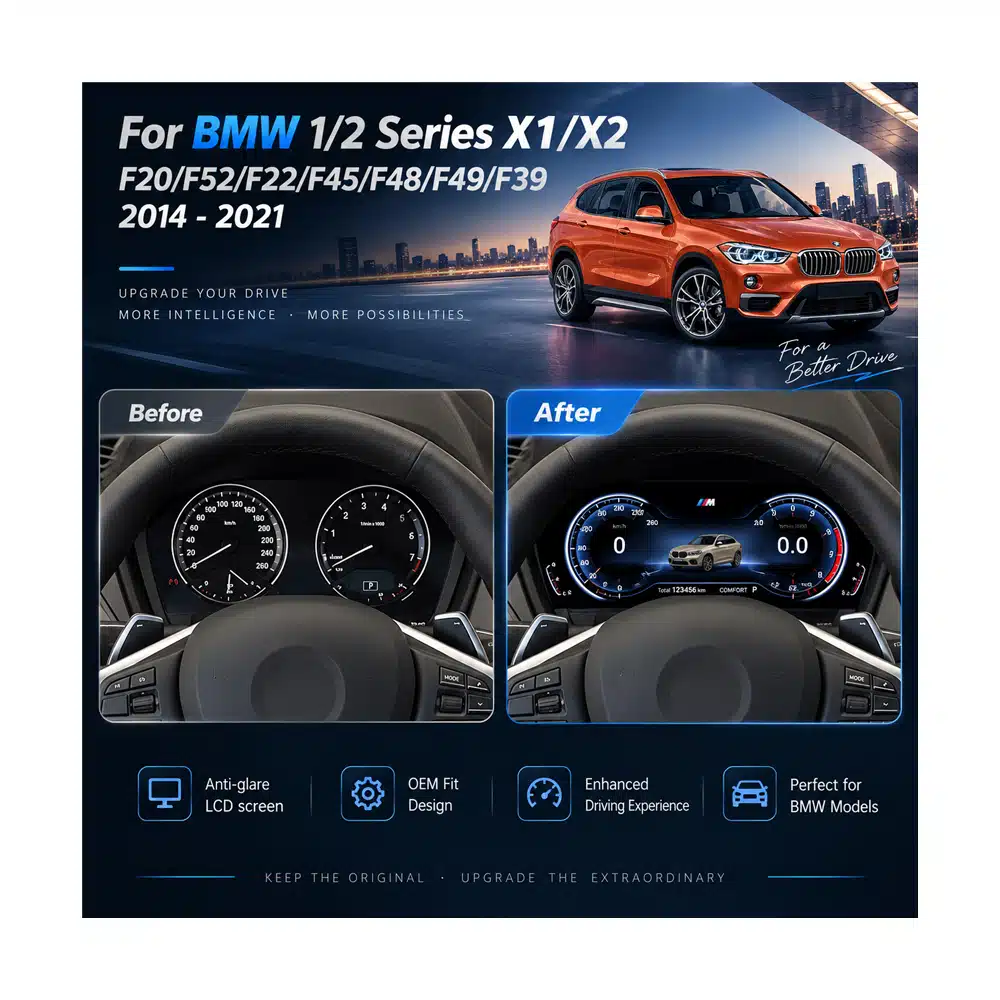
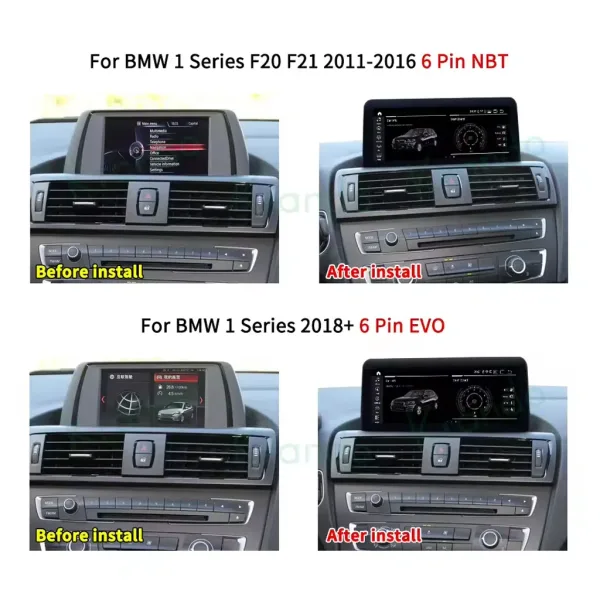
BMW F20 Upgrade Guide: What Should You Upgrade First?
This sounds simple, but it prevents a common mistake: buying the upgrade with the longest feature list instead of fixing the part of the car you actually interact with most.
Digital Cluster First
Best when you still like the original center system but the mechanical gauges make the driver's side of the cabin feel dated.
Android Screen First
Best when your real frustration is the small factory display, navigation experience, phone projection or lack of modern app access.
Complete Cockpit Upgrade
Best when both sides of the dashboard now feel older than the way the F20 still drives and you expect to keep the car.
Why an Older BMW F20 Can Still Be Worth Modernizing
The strongest reason to upgrade an F20 is not that the whole car has become obsolete. It is that the driving experience can age more slowly than the electronics you look at and use on every journey.
Your phone is more useful than the factory screen
If every trip starts with maps, music, calls or messages, the center-screen route changes more of your routine than a cosmetic interior modification.
The gauges are the part you see on every drive
If the original center system still does its job but the analog cluster dates the driver's view, a digital cluster targets the exact area that bothers you.
The performance still feels current; the dashboard does not
A modern cockpit can make more sense than replacing a car you still enjoy for its engine, chassis and rear-drive character.
You expect to keep the car for several more years
Improving navigation, phone integration and the driver display can deliver value on every future journey rather than only changing the car's appearance.
The car is right, but the original specification was basic
A used F20 with a basic screen or mechanical cluster can be a strong upgrade candidate because you can improve the parts you actually use without replacing the whole vehicle.
You have already upgraded one side of the dashboard
If the center screen is modern but the cluster still feels old—or the reverse—the second upgrade can make the cockpit feel intentional rather than half-finished.
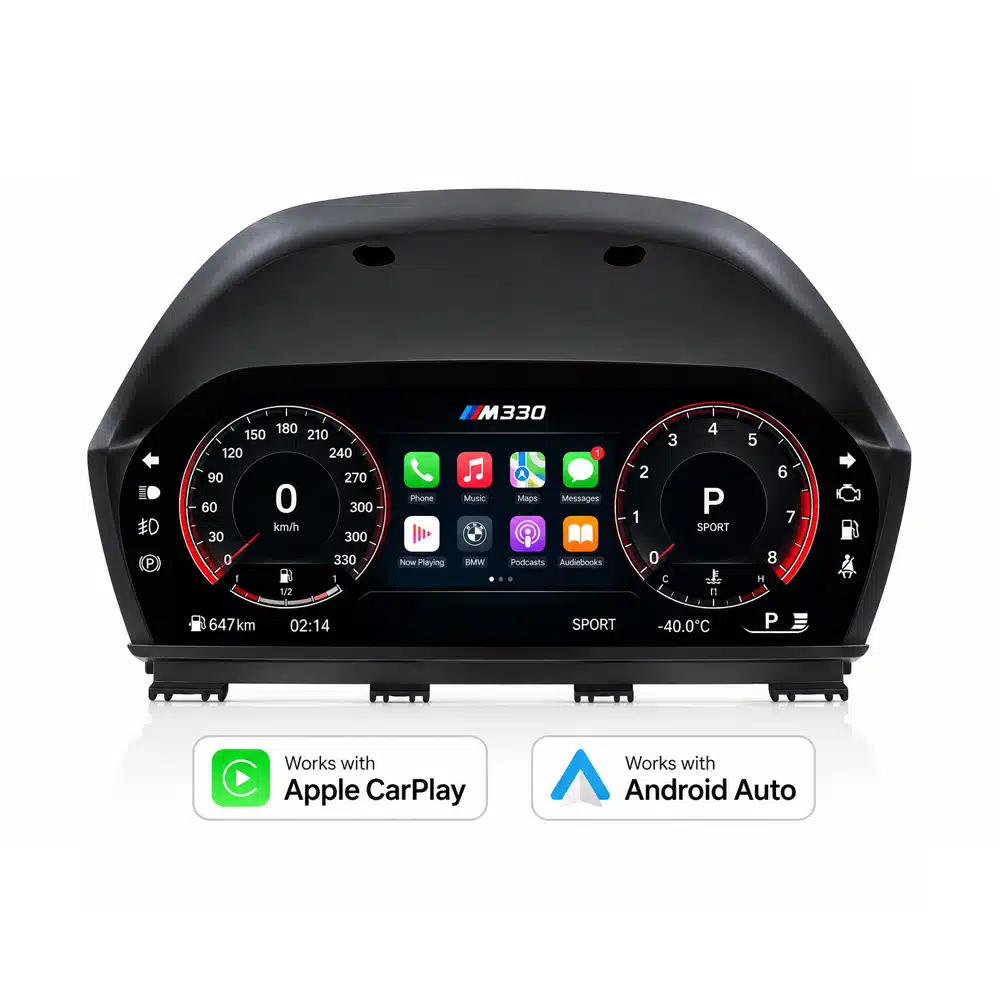
BMW F20 Cluster Upgrade: When Does a Full Digital Display Make More Sense?
Speed, RPM, fuel level, coolant temperature, mileage, trip information, range, fuel consumption, supported warnings and service information remain part of the cluster experience. Original steering-wheel button functions are also retained on the supported route.
This matters because a useful BMW F20 cluster upgrade should still behave like an instrument panel after the visual novelty wears off. The upgrade is strongest when the car keeps giving you the information you rely on while the driver's view becomes substantially more modern.
BMW F20 6WA Retrofit vs Full Digital Cluster: What Are You Actually Choosing?
BMW F20 6WA Retrofit
- Appeals to owners who prioritize an OEM BMW retrofit route.
- Retains a more factory-period instrument appearance.
- Retrofit work can involve vehicle-specific coding and MOST considerations depending on the original equipment.
- Best suited to buyers whose goal is OEM specification rather than a full LCD cockpit transformation.
iKAGOO Full Digital Cluster
- 10.25″ 1920×720 full LCD changes the driver's view much more visibly.
- Supports Apple CarPlay and Android Auto on this confirmed F20 product route.
- Retains the supported core driving data and steering-wheel controls.
- Standard confirmed installation route does not require coding.
If you are searching BMW F20 6WA retrofit because you want a better-looking instrument panel, decide what you actually want at the end: a more factory-period BMW cluster, or a visibly different digital cockpit.
That distinction is more useful than assuming every “upgrade” is competing for the same buyer.
Want the full digital route rather than an OEM-style 6WA retrofit?
See the current F20 cluster functions, fitment boundaries and live configuration.
BMW F20 Screen Upgrade: When Is the 12.3″ Android Display the Better First Upgrade?
This route makes the biggest difference when you use navigation, calls, music and phone apps frequently. Instead of keeping a small factory display and adding another visible device, the upgraded screen stays in the BMW dashboard line and gives those functions more usable space.
It is also more complete than a CarPlay-only interface when your goal is not merely phone projection. The Android platform adds its own app environment, while supported original BMW functions such as iDrive-style control, steering-wheel controls, factory audio output, parking information and original-system access can continue after correct matching and setup.
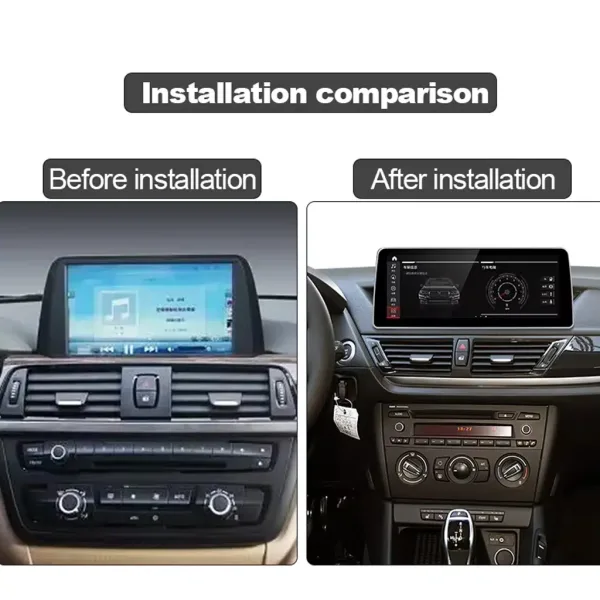
BMW F20 CarPlay Upgrade: Interface Box, Android Screen or Digital Cluster?
| Your Main Goal | Most Logical Route | ما التغييرات | أين يتناسب iKAGOO |
|---|---|---|---|
| Keep the original screen and only add phone projection | CarPlay-focused interface route | Connectivity changes; the visible dashboard stays largely the same. | Useful comparison point before deciding whether a full screen is worth buying. |
| Larger screen + Wireless CarPlay + Android Auto + Android apps | 12.3″ Android screen | The center infotainment experience changes substantially. | 2013–2017 F20 NBT/EVO route with system matching before preparation. |
| Modern driver display + CarPlay/Android Auto capability | لوحة العدادات الرقمية | The area behind the steering wheel becomes the focus of the upgrade. | Mechanical-cluster route with core BMW driving data retained. |
| Both center display and gauges feel old | Cluster + Android screen | The cockpit becomes visually and functionally more consistent. | Each product is checked according to its own vehicle-specific requirements. |
Can You Upgrade Both the BMW F20 Digital Cluster and Android Screen?
This route makes the most sense for an owner who plans to keep the F20 and already knows that both parts of the original cockpit now feel dated. The cluster changes what you see directly through the steering wheel. The Android screen changes how you use navigation, music, calls and apps.
Together, the result is more coherent than changing one side simply because it was the first product you found online.
BMW F20 Upgrade Guide: Which Years and International Model Names Does This Article Cover?
| السوق | Common Name | Common Search / Badge References | Buying Note |
|---|---|---|---|
| UK / Ireland | BMW 1 Series 5-door Sports Hatch / BMW 1 Series F20 | 114i, 116i, 118i, 120i, 125i, M135i, M140i; 114d, 116d, 118d, 120d, 125d depending on year | RHD must be stated. Trim badge does not replace chassis and original-system confirmation. |
| Germany / Austria / German-speaking markets | BMW 1er 5-Türer / BMW 1er F20 | 114i–125i, M135i/M140i and 114d–125d families depending on production period | Use F20 plus the actual original cluster or NBT/EVO system when selecting the upgrade. |
| فرنسا | BMW Série 1 5 portes / BMW Série 1 F20 | 116i, 118i, 120i, 125i, M135i/M140i and diesel equivalents depending on year | Model badge alone does not confirm the instrument or infotainment version. |
| اسبانيا | BMW Serie 1 5 puertas / BMW Serie 1 F20 | 114i, 116i, 118i, 120i, 125i, M135i/M140i; 114d–125d depending on year | Confirm F20 rather than assuming every second-generation 1 Series body is identical. |
| ايطاليا | BMW Serie 1 5 porte / BMW Serie 1 F20 | 114i–125i, M135i/M140i and diesel variants according to local model year | Screen route still depends on original NBT/EVO configuration. |
| Netherlands / Belgium | BMW 1 Serie 5-deurs / BMW 1 Series F20 | Petrol, diesel and xDrive variants vary by local year and market | Identify the actual chassis and original electronics rather than ordering from the badge alone. |
| أستراليا / نيوزيلندا | BMW 1 Series Hatch / BMW 1 Series F20 | Common examples include 118i, 118d, 120i, 125i, M135i and M140i depending on year | RHD must be confirmed for the center-screen route. |
| United States / Canada | Imported BMW F20 / imported 1 Series hatch | The F20 hatch was not a normal new-car North American-market 1 Series offering | Imported vehicles should be identified by F20 chassis, production year and actual original equipment. |
F20 and F21 are not the same body code. F20 refers to the five-door hatchback; F21 is the related three-door hatchback. The current iKAGOO digital-cluster fitment records include selected related F-series chassis, but this article and the Android-screen recommendation are intentionally centered on the F20.
BMW F20 Upgrade Guide: Why NBT, EVO and the Original Cluster Matter More Than the Badge
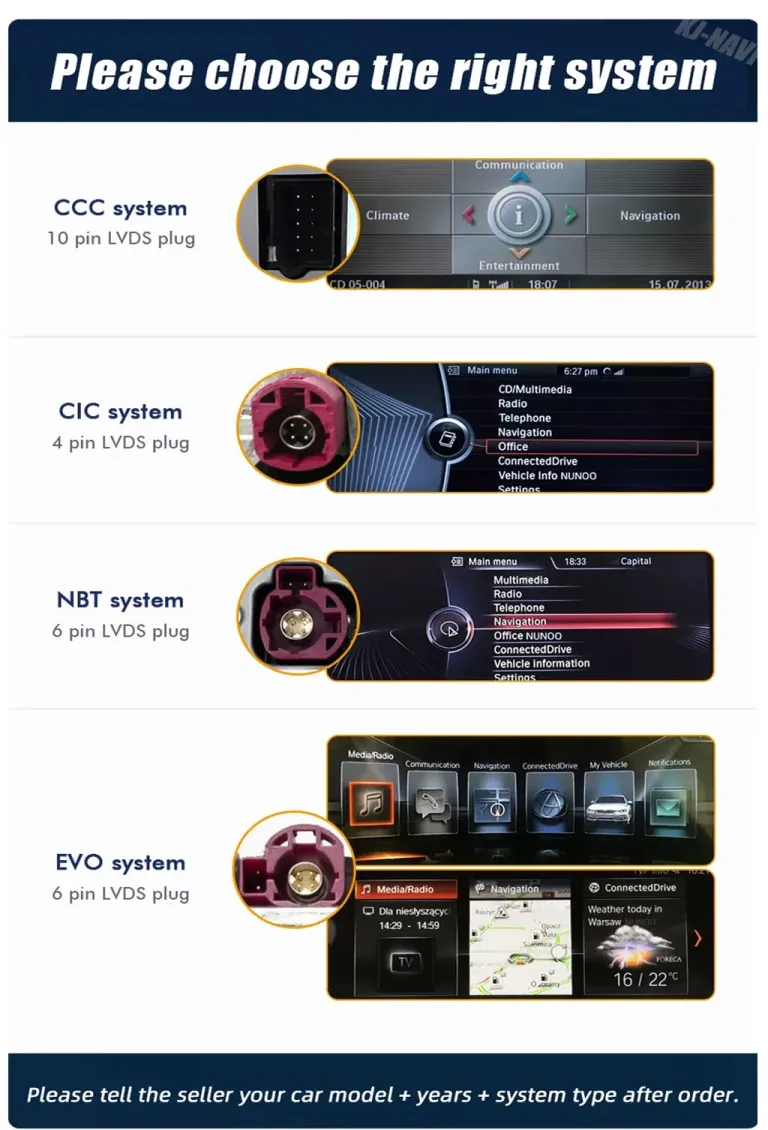
For the Android screen
The current iKAGOO F20 Android product is designed around supported NBT or EVO configurations. BMW CCC, CIC, NBT and EVO systems can use different screen connections and interface logic.
For the digital cluster
The current F20 digital cluster requires the supported factory mechanical-dial instrument cluster. Cars already fitted with the factory LCD digital cluster are not supported by this version. Hybrid/PHEV variants are also excluded from the current product route.
If the car has factory HUD
Tell iKAGOO before the cluster is prepared. The supported route can retain factory HUD through the appropriate BMW HUD interface module where applicable.
What Original BMW Functions Matter After the F20 Upgrade?
| الوظيفة | Digital Cluster Route | Android Screen Route |
|---|---|---|
| السرعة / عدد الدورات | Retained on the supported F20 cluster route. | Remains part of the original vehicle/instrument system; the screen is not replacing the instrument cluster. |
| Fuel / Temperature | Retained as supported vehicle data. | Not the main function of the center-screen upgrade. |
| Mileage / Trip / Range | Retained on the confirmed digital-cluster route. | Original vehicle systems remain separate from the Android display upgrade. |
| Warnings / Service Information | Supported warnings, door-open alerts and service information remain available. | Vehicle and parking information retention depends on the matched original-system interface. |
| أزرار التحكم الموجودة على عجلة القيادة | Original button functions retained on the supported route. | Supported after correct wiring and vehicle-interface configuration. |
| Original iDrive / BMW System | The cluster is a separate driver-display upgrade. | Supported original-system access remains available after correct matching and setup. |
| Factory Audio / Parking Information | Not the primary function of the cluster route. | Supported functions can continue through the correctly matched interface; special audio should be declared. |
Does a BMW F20 Digital Cluster or Android Screen Require Coding?
“Plug & Play” should describe the connector strategy, not imply that dashboard work disappears. Both upgrades require the relevant trim or original component to be removed, the matched hardware connected, and the required functions tested before final reassembly.
The cluster route uses OEM-style connections without deliberate factory-wire cutting. The Android screen also uses a matched harness approach for the supported original system rather than intentionally cutting the supported factory main wiring.
BMW F20 Upgrade Guide: What Purchase Concerns Does iKAGOO Actually Remove?
“What if iKAGOO confirmed my car and the compatibility decision was actually wrong?”
This is a better question than asking whether every F20 in a year range is automatically identical. Under the current iKAGOO Return and Refund Policy, a customer who received written compatibility confirmation, supplied accurate information, reports the issue within seven calendar days of confirmed delivery and completes the required technical review may qualify for the special compatibility-error remedy if iKAGOO confirms its original assessment was wrong and no reasonable technical solution remains.
When all published conditions are met and iKAGOO confirms its own written matching decision was incorrect, the eligible device purchase price may be refunded without requiring an international product return. Shipping, DDP, duties, taxes, installation labour and other third-party costs are separate unless mandatory law requires otherwise.
Read the complete Return & Refund Policy →“What happens after the first year?”
Eligible iKAGOO Android head units and digital instrument clusters currently include a ضمان محدود على الأجهزة لمدة 12 شهراً, 3-year free remote software-support route for eligible original purchasers, and a 5-year parts-and-upgrade support route. These are separate commitments: the longer software and parts periods do not turn the hardware warranty into five years of free replacement.
BMW F20 Upgrade Guide: Questions Owners Ask Before Choosing a Cluster or Android Screen
What is the best way to modernize a BMW F20 interior?
Can you upgrade the instrument cluster on a BMW F20?
BMW F20 6WA retrofit or full digital cluster — which is better for me?
Does the iKAGOO BMW F20 digital cluster require coding?
Will the BMW F20 digital cluster keep the original mileage?
Will speed, RPM, fuel level and warning lights still work after the BMW F20 cluster upgrade?
Can the BMW F20 digital cluster display Apple CarPlay and Android Auto?
Can I install the iKAGOO BMW F20 digital cluster if my car already has a factory LCD cluster?
Does the BMW F20 digital cluster support hybrid or PHEV models?
Can you add Wireless Apple CarPlay to a BMW F20?
Does the BMW F20 Android screen support Android Auto?
How do I know whether my BMW F20 has NBT or EVO?
Will the original iDrive and steering-wheel controls work with the BMW F20 Android screen?
BMW F20 digital cluster or Android screen — which should I upgrade first?
Can I upgrade both the BMW F20 cluster and center screen?
Which BMW F20 years does the iKAGOO Android screen support?
Which BMW F20 years does the iKAGOO digital cluster support?
Does the BMW F20 digital cluster work with factory HUD?
Do I need to cut the factory wiring for either BMW F20 upgrade?
What should I send iKAGOO before ordering a BMW F20 cockpit upgrade?
Why buy the BMW F20 upgrade from iKAGOO instead of choosing a similar-looking unit?
BMW F20 Upgrade Guide: Modernize the Part You Notice Most — Then Complete the Cockpit If You Want More
You do not need a newer 1 Series just because the original electronics now show their age. If the F20 still gives you the size, handling and driving character you want, upgrading the part you interact with every day can be the more focused decision.
Choose the digital cluster when the driver's view is the priority. Choose the Android screen when maps, phone connectivity and the center display are the priority. Choose both when you already know you want the complete cockpit to move forward together.
Whichever route fits you, the reason to buy through iKAGOO is not simply that the hardware exists. The value is that the exact product route, original BMW configuration, matched preparation and later support remain connected instead of becoming your problem after the box arrives.
Current direct product references: BMW F20 Digital Cluster marketed for 2012–2018 supported mechanical-cluster vehicles; BMW F20 NBT EVO Android Head Unit for supported 2013–2017 F20 NBT/EVO vehicles. Exact fitment, retained functions and required accessories follow the confirmed vehicle and selected product version.








Add comment
يجب أنت تكون مسجل الدخول لتضيف تعليقاً.